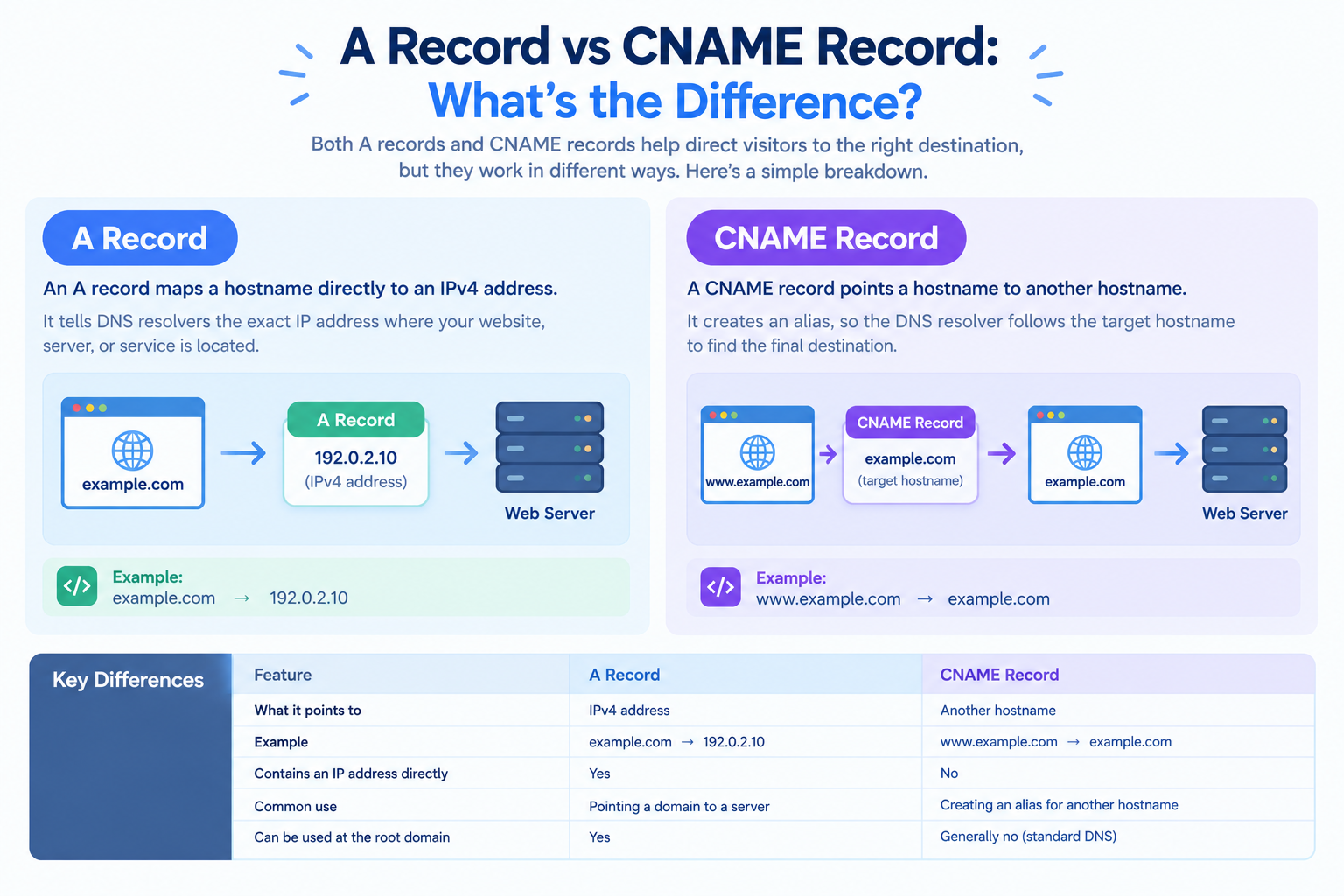
When configuring DNS for your domain, you may encounter two common record types: A records and CNAME records.
Both help direct visitors to the correct destination, but they work differently. An A record maps a hostname directly to an IPv4 address, while a CNAME record points one hostname to another hostname.
Choosing the correct record is important when connecting your domain to a hosting account, setting up a www subdomain, or configuring third-party services.
So, what is the difference between an A record and a CNAME record?
In this guide, you will learn how both records work, when to use each one, and how to check or configure them for your domain.
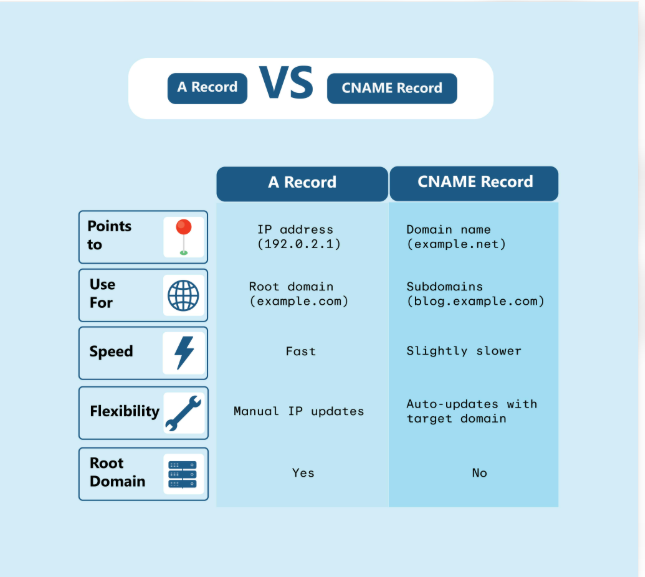
What Is an A Record?
An A record, short for Address record, connects a hostname to an IPv4 address.
An IPv4 address is a numerical address used to identify a destination on an IP network. For example, a website server may have an IPv4 address such as 192.0.2.10.
When someone visits a domain with an A record, DNS can return the associated IPv4 address so the visitor’s device can connect to the server.
Example of an A Record
Suppose your domain is:
example.com
You want it to point to a web server with the IPv4 address 192.0.2.10.
Your DNS record could look like this:
| Field | Value |
|---|---|
| Type | A |
| Name | @ or the root domain, depending on the DNS provider |
| Value | 192.0.2.10 |
| TTL | 3600 |
The IP address is an illustrative example, not an actual hosting server address.
The @ symbol commonly represents the root domain, such as example.com, although the exact format depends on your DNS provider.
When Should You Use an A Record?
An A record is useful when you want to point a hostname directly to a known IPv4 address.
Common uses include:
- Pointing your root domain to your web hosting server.
- Directing a subdomain to a specific IPv4 address.
- Connecting a domain to a server when your hosting provider supplies an IPv4 address.
- Configuring a hostname that needs to resolve directly to an IPv4 address.
For example, if your hosting provider gives you the IP address for your website, you can use an A record to point your domain to that address.
If you use HawkHost, check the correct server IP address and DNS instructions for your hosting account before creating or changing a record.
Important: An A record only maps a hostname to an IPv4 address. If you also need IPv6 connectivity, you may need an AAAA record.
What Is a CNAME Record?
A CNAME record, short for Canonical Name record, points one hostname to another hostname.
Unlike an A record, a CNAME record does not directly contain an IPv4 address. Instead, it identifies another DNS name whose records can be looked up to find the destination.
For example, you may want www.example.com to use the same destination as example.com.
You could configure a CNAME record for www that points to example.com.
Example of a CNAME Record
Your DNS record could look like this:
| Field | Value |
|---|---|
| Type | CNAME |
| Name | www |
| Target | example.com |
| TTL | 3600 |
In this example, www.example.com is an alias for example.com.
When a DNS resolver looks up www.example.com, it follows the CNAME to example.com and resolves the destination using the records associated with that name.
The final answer may include an IPv4 address, an IPv6 address, or another relevant result, depending on the DNS configuration.
When Should You Use a CNAME Record?
A CNAME record is useful when one hostname should follow another hostname rather than point directly to a fixed IP address.
Common uses include:
- Pointing
www.example.comtoexample.com. - Connecting a subdomain to a hostname provided by a third-party service.
- Setting up a hostname for a platform that instructs you to use a CNAME record.
- Avoiding the need to maintain a separate IP address for an alias hostname.
For example, a third-party service may instruct you to create a CNAME record for store.example.com that points to a hostname supplied by the service.
In that situation, follow the provider’s exact instructions. Do not replace the required CNAME with an A record unless the provider explicitly supports that configuration.
A Record vs CNAME Record: Key Differences
The main difference is what each record points to.
An A record points a hostname to an IPv4 address. A CNAME record points a hostname to another hostname.
| Feature | A Record | CNAME Record |
|---|---|---|
| Full name | Address record | Canonical Name record |
| Points to | IPv4 address | Another hostname |
| Example | example.com → 192.0.2.10 | www.example.com → example.com |
| Contains an IP address directly | Yes | No |
| Common use | Pointing a domain to a server’s IPv4 address | Creating an alias for another hostname |
| Can follow another hostname’s DNS destination | No, not through the A record itself | Yes, through the CNAME target |
Typical use for www | Possible | Common |
| Suitable for the root domain | Yes | Generally no for a standard DNS CNAME |
| Can coexist with other ordinary records at the same hostname | Yes, subject to DNS rules | Generally no; a CNAME cannot normally coexist with other data at the same name |
Both records can be useful for connecting a domain to a website. The right choice depends on the hostname you are configuring and the instructions from your hosting or service provider.
A Record vs CNAME: Which One Should You Use?
The easiest way to decide is to check whether you have an IP address or a target hostname.
<box border radius=”lg” padding={4} gap={3}>
<row align=start gap={3}>
<box background=”rgba(37,99,235,0.12)” radius=”md” size=”44px” align=center justify=center>
<icon name=”server” size=”xl” color=”#2563eb” />
</box>
<box flex=”1″ gap={1}>
**Use an A record when you have an IPv4 address.**
  <text color="secondary" size="sm">Example: Your hosting provider tells you to point `example.com` to `192.0.2.10`.</text>
</box>
</row>
<divider color=”subtle” />
<row align=start gap={3}>
<box background=”rgba(5,150,105,0.12)” radius=”md” size=”44px” align=center justify=center>
<icon name=”git-branch” size=”xl” color=”#059669″ />
</box>
<box flex=”1″ gap={1}>
**Use a CNAME record when you have a target hostname.**
  <text color="secondary" size="sm">Example: A service tells you to point `app.example.com` to `customer.service.example.net`.</text>
</box>
</row>
</box>
Scenario 1: Pointing Your Root Domain to Web Hosting
Suppose your hosting provider gives you an IPv4 address for your website.
You can create an A record for the root domain:
Type: A
Name: @
Value: 192.0.2.10
This directs the root domain to the specified IPv4 address.
Use the actual address supplied by your hosting provider. The example above is only for illustration.
Scenario 2: Pointing the WWW Subdomain to Your Root Domain
Suppose you want both of these addresses to reach your website:
example.comwww.example.com
One possible configuration is:
Type: A
Name: @
Value: 192.0.2.10
And:
Type: CNAME
Name: www
Target: example.com
In this setup, the root domain points to the IPv4 address, while www follows the DNS destination of the root domain.
Alternatively, you may configure www with its own A record if that is appropriate for your setup. Follow your hosting provider’s recommendations.
Scenario 3: Connecting a Subdomain to a Third-Party Service
Suppose an external service tells you to connect:
app.example.com
to:
customer.service.example.net
If the service specifically requests a CNAME record, your DNS configuration might look like this:
Type: CNAME
Name: app
Target: customer.service.example.net
The exact target must come from the service provider.
This configuration allows the service’s hostname to determine its own DNS destination. If the service changes the IP addresses associated with its target hostname, your CNAME can continue to point to that hostname without you manually updating an IP address.
However, the service may also require domain verification or other DNS records, so follow its full setup guide.
Can You Use an A Record and a CNAME Record for the Same Domain?
The answer depends on the exact hostname.
You can use an A record for the root domain and a CNAME record for a separate hostname such as www.
For example:
example.com       A       192.0.2.10
www.example.com   CNAME   example.com
These records apply to different names, so this is a common configuration.
However, you generally cannot configure an A record and a CNAME record for the same hostname at the same time.
For example, avoid configuring both of these for www.example.com:
www.example.com   A       192.0.2.10
www.example.com   CNAME   example.com
A standard CNAME cannot coexist with other ordinary DNS records at the same name. There are special cases involving DNSSEC-related records and provider-specific features, but these do not make an ordinary A-plus-CNAME configuration valid.
If you need a hostname to point to multiple IP addresses, multiple A records may be appropriate in some configurations. If you need a hostname to follow another hostname, a CNAME may be more suitable.
Why Is a CNAME Usually Not Allowed at the Root Domain?
The root domain, also called the apex or zone apex, is the domain itself, such as example.com.
A standard CNAME is generally not permitted at the root of a DNS zone because the root must also contain essential records, including SOA and NS records. A standard CNAME cannot coexist with those records.
For example, this is a common configuration:
example.com       A       192.0.2.10
www.example.com   CNAME   example.com
But a standard DNS configuration like this is generally not valid:
example.com CNAME target.example.netSome DNS providers offer features called CNAME flattening, ALIAS, or ANAME to support similar behavior at the root domain. These are provider-specific features, not ordinary CNAME records in the standard DNS sense.
If a service asks you to connect your root domain using a CNAME, check whether it supports one of these features or offers another recommended setup.
How to Check an A Record or CNAME Record
After configuring DNS, check that the records return the expected results.
Method 1: Use an Online DNS Lookup Tool
You can use DNSChecker to check DNS records.
Follow these steps:
- Open DNSChecker.
- Enter your domain or hostname.
- Select A to check an IPv4 address or CNAME to check an alias.
- Run the lookup.
- Compare the result with your intended configuration.
For example, if you want to check the A record for example.com, enter the root domain and select A.
To check whether www.example.com has a CNAME record, enter that hostname and select CNAME.
Remember that a hostname may not have a CNAME record if it is configured with A or AAAA records instead. A missing CNAME result does not automatically mean that the hostname is broken.
Method 2: Check Records on Windows
Windows includes the nslookup command.
Open Command Prompt and run:
nslookup -type=A example.comTo check a CNAME record, run:
nslookup -type=CNAME www.example.comReplace the example hostnames with your own domain.
Compare the returned values with your DNS configuration.
Method 3: Check Records on macOS or Linux
Open Terminal and use the dig command if it is available.
To check an A record:
dig example.com ATo check a CNAME record:
dig www.example.com CNAMELook at the answer section in the output.
If you recently changed your DNS records, the results may temporarily differ between resolvers because of caching. You can compare results from multiple resolvers to investigate.
For a more detailed walkthrough, read How to Check DNS Records for a Domain.
How to Change an A Record or CNAME Record in cPanel
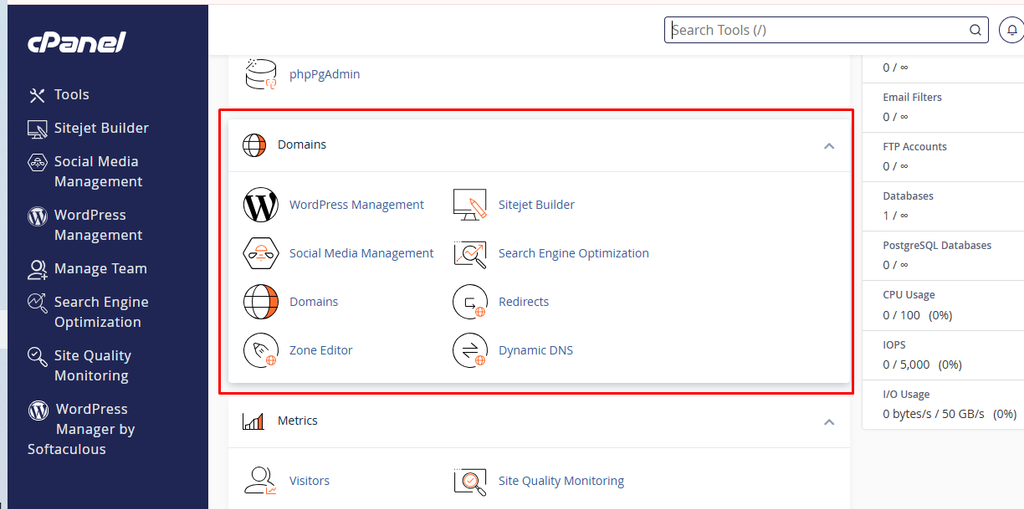
If your DNS zone is managed through HawkHost cPanel, you may be able to review or change these records using the Zone Editor.
Step 1: Log In to cPanel
Log in to your HawkHost Client Area and open the relevant hosting service.
Access cPanel using the available login option.
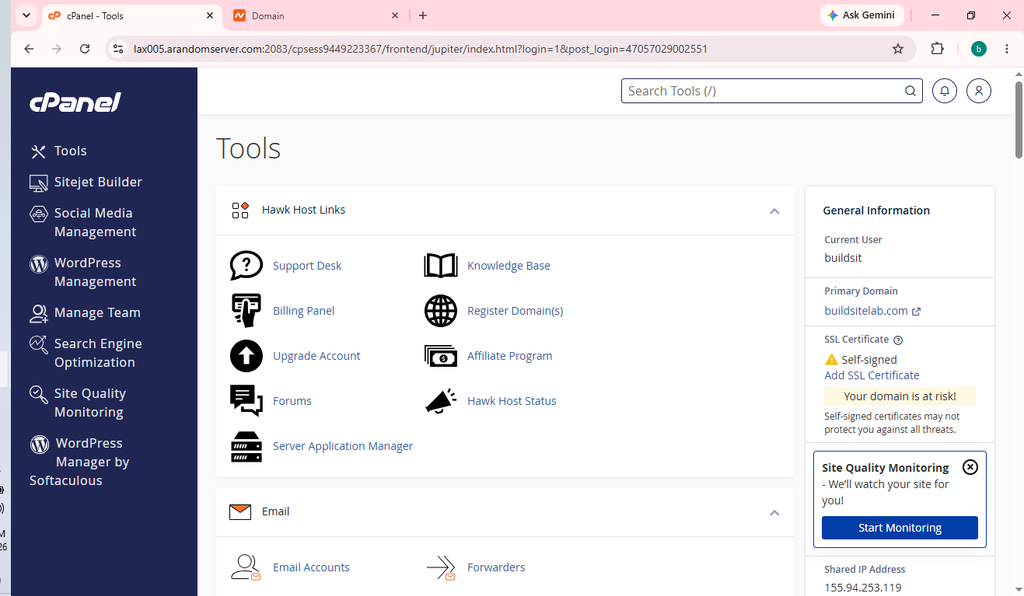
If you need help, see our guide to How to Access HawkHost cPanel.
Step 2: Open the Zone Editor
In cPanel, look for Domains → Zone Editor, or search for “Zone Editor” using the cPanel search feature.
The exact interface and available options can vary by hosting configuration.
Step 3: Find Your Domain
Locate the domain whose DNS records you want to manage.
If a Manage option is available, open it to view the records in that DNS zone.
Step 4: Review or Edit the Record
Before editing a record, confirm the correct value with your hosting provider or the service you are connecting.
- For an A record, verify the IPv4 address.
- For a CNAME record, verify the target hostname.
- Check that you are editing the correct hostname.
- Avoid creating a CNAME alongside other ordinary records at the same name.
Save the change if you have confirmed that the new value is correct.
Important: cPanel may not control the active DNS records for your domain. If your domain uses nameservers from another DNS provider, you generally need to make DNS changes at that provider instead.
After making changes, use an external DNS lookup tool to check the publicly returned records.
Common Mistakes When Choosing A vs CNAME
Mistake 1: Using a CNAME Instead of an A Record for the Root Domain
A standard CNAME generally cannot be used at the root of a DNS zone because the root requires other records.
How to avoid it: Use the record type recommended by your DNS provider. For a typical website hosted on a server with a known IPv4 address, an A record at the root is common.
Mistake 2: Pointing a CNAME to an IP Address
A CNAME target should be a hostname, not an IP address.
Incorrect example:
Type: CNAME
Name: www
Target: 192.0.2.10
If you need to point www directly to an IPv4 address, an A record may be suitable instead.
Mistake 3: Creating a CNAME Alongside an A Record at the Same Name
A standard CNAME cannot normally coexist with an A record at the same hostname.
How to avoid it: Decide whether the hostname should point directly to an IPv4 address or alias another hostname. Remove conflicting records only after confirming which configuration is required.
Mistake 4: Editing DNS Records at the Wrong Provider
Your domain registrar, hosting company, and DNS provider may be different companies.
Changing records in one account will not necessarily affect the active DNS zone.
How to avoid it: Check your domain’s authoritative nameservers first. Then manage the records with the provider responsible for that DNS zone.
Mistake 5: Expecting Changes to Appear Immediately
DNS records may be cached by resolvers, so a change may not be visible everywhere at once.
How to avoid it: Check the record from multiple resolvers, review the TTL, and allow time for cached responses to expire.
Frequently Asked Questions
Is an A record better than a CNAME record?
Neither is universally better. An A record is appropriate when you want to point a hostname directly to an IPv4 address. A CNAME is appropriate when you want one hostname to alias another hostname.
Does a CNAME record redirect visitors to another website?
No. A CNAME is a DNS alias, not an HTTP redirect.
For example, a CNAME can make www.example.com resolve using the DNS destination of example.com. It does not automatically change the visitor’s browser address bar or redirect the browser to a different URL.
If you want visitors to move from one URL to another, you generally need an HTTP redirect configured by your website or web server.
Should I use an A record or CNAME for www?
A CNAME pointing www to the root domain is common. However, an A record may also be appropriate if you want www to point directly to an IPv4 address.
Follow your hosting provider’s recommended configuration.
Can a CNAME point to another CNAME?
Yes. A CNAME can point to another hostname that itself has a CNAME record, forming a chain. DNS resolvers follow the chain to resolve the final destination.
However, unnecessarily long chains can add lookup steps, so simple configurations are often easier to maintain.
Does a CNAME record affect website speed?
A CNAME may require additional DNS resolution steps, depending on the configuration and caching. In many ordinary setups, the practical impact is small, but the result depends on the DNS chain and resolver behavior.
Website performance also depends on factors such as server response time, caching, network conditions, and page resources.
Can I use a CNAME for email?
CNAME records may be used for certain service hostnames when an email provider specifically instructs you to do so. However, you cannot replace the domain’s MX records with a CNAME, and a hostname with a standard CNAME cannot also hold ordinary MX or TXT records at the same name.
Follow the email provider’s DNS instructions carefully.
What happens if I delete an A record or CNAME record?
The hostname may stop resolving to the expected destination. Your website, subdomain, or connected service could become unavailable.
Before deleting a record, confirm that it is no longer needed and save a copy of the existing configuration.
Conclusion
The difference between an A record and a CNAME record is straightforward:
- A record: Points a hostname directly to an IPv4 address.
- CNAME record: Points a hostname to another hostname.
Use an A record when your hosting provider gives you an IPv4 address for your domain. Use a CNAME when a hostname needs to follow another hostname, such as when configuring www or connecting certain third-party services.
Before making DNS changes, confirm which provider manages your active DNS zone and follow the exact instructions for your hosting or application.
To continue learning, read What Is DNS? A Beginner’s Guide or follow our tutorial on How to Check DNS Records for a Domain.