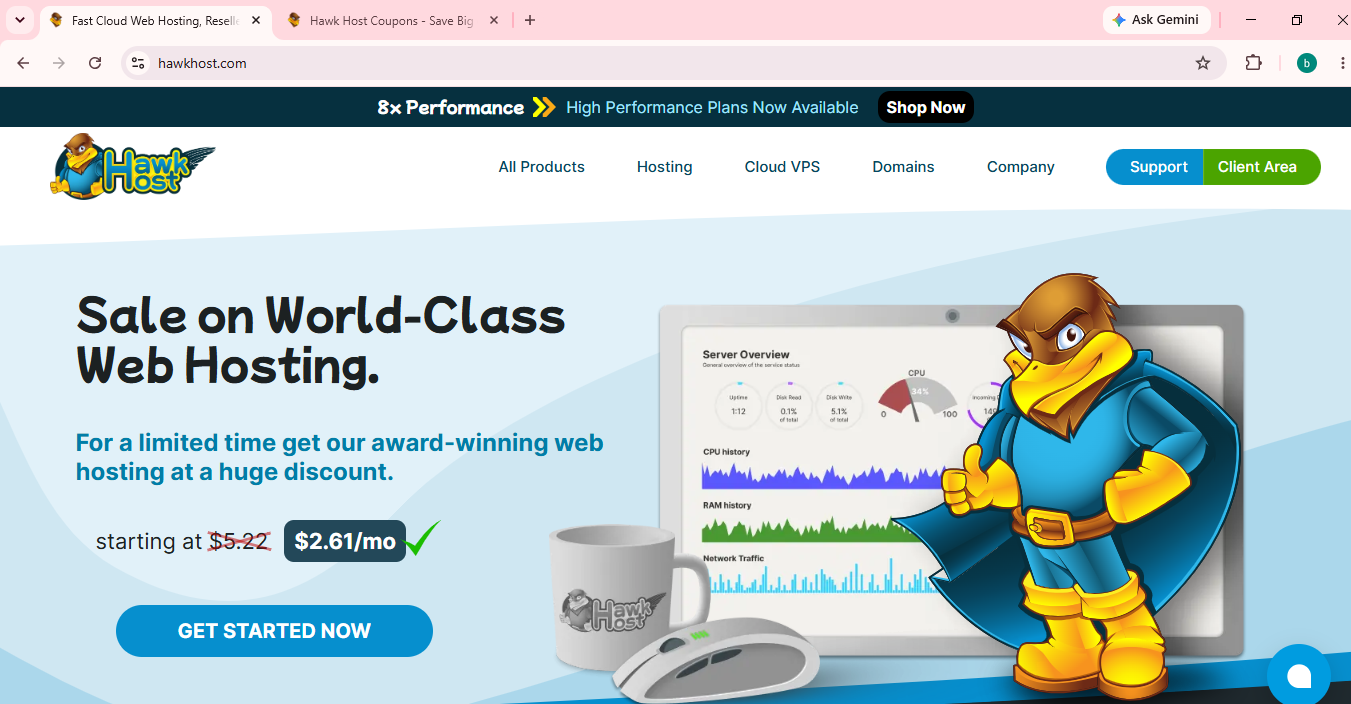
When I started building this website, I spent a lot of time comparing hosting providers. I wanted something affordable, beginner-friendly, and reliable enough for a new WordPress site.
After comparing several options, I decided to purchase HawkHost Shared Hosting.
Rather than writing a review based only on marketing claims, this article documents my own experience—from purchasing the hosting plan to setting up WordPress and monitoring its performance over time.
Update history
- July 24, 2026 – Purchased HawkHost hosting and built this website.
- Future updates – I’ll continue updating this review with performance tests, uptime, support experience, and long-term observations.
Quick Verdict
| Category | Rating |
|---|---|
| Ease of Use | ⭐⭐⭐⭐⭐ |
| Setup Process | ⭐⭐⭐⭐⭐ |
| Pricing | ⭐⭐⭐⭐⭐ |
| Performance | ⭐⭐⭐⭐☆ (ongoing testing) |
| Support | ⭐⭐⭐⭐☆ (will update) |
| Overall | ⭐⭐⭐⭐⭐ |
Note: The performance and support ratings will be updated as I continue using HawkHost.
Why I Chose HawkHost
Before buying hosting, my priorities were:
- Affordable pricing
- cPanel instead of a custom control panel
- LiteSpeed web server
- Free SSL certificates
- Support for multiple websites
- A provider with a long operating history
HawkHost met all of these requirements, which is why I chose it for this project.
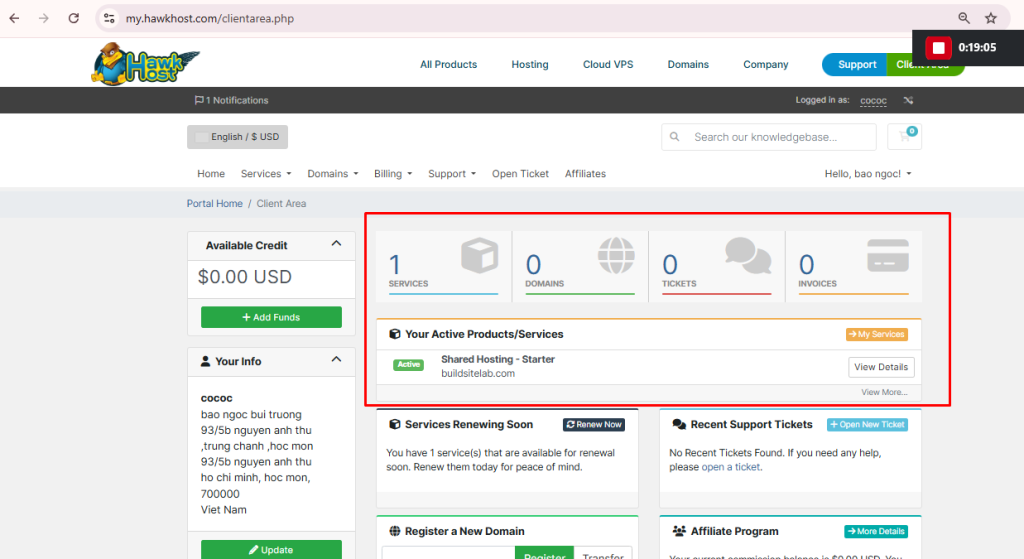
Buying HawkHost
Purchasing the hosting plan was straightforward.
The process was:
- Select a hosting plan.
- Choose a billing cycle.
- Enter or connect a domain.
- Complete payment.
- Receive the activation email.
- Access the Client Area.
The activation email arrived quickly, and I was able to log in without any issues.
First Impression of the Client Area
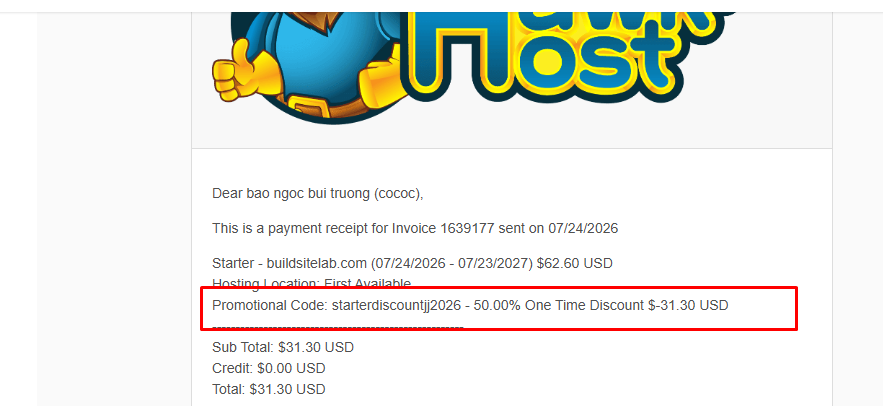
After logging in, I was taken to the HawkHost Client Area.
From here, I could:
- Manage hosting services
- Manage domains
- View invoices
- Open support tickets
- Access cPanel
The interface isn’t flashy, but it’s clean and easy to navigate.
Accessing cPanel
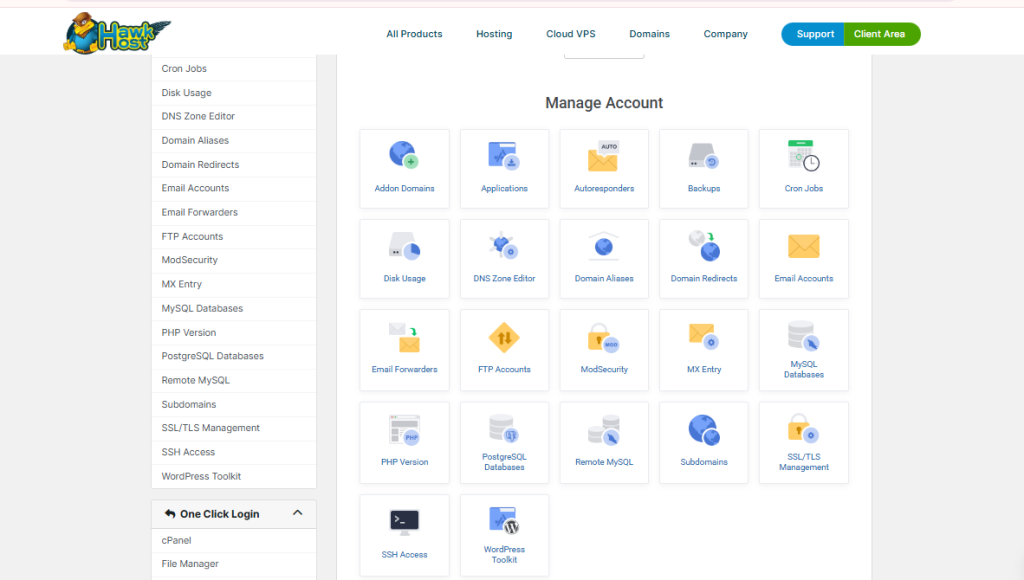
One thing I appreciate is that HawkHost still uses cPanel, which many website owners are already familiar with.
Inside cPanel I found:
- File Manager
- Domains
- SSL/TLS
- Email Accounts
- PHP Settings
- Databases
- Softaculous WordPress Installer
Everything I needed to launch a WordPress website was available in one place.
CPANEL
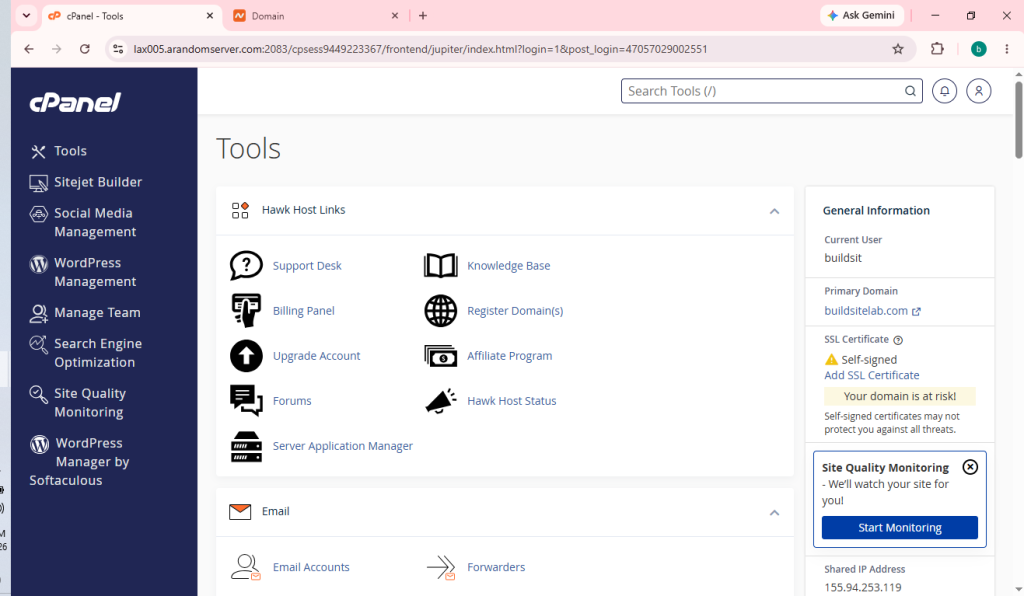
File Manager
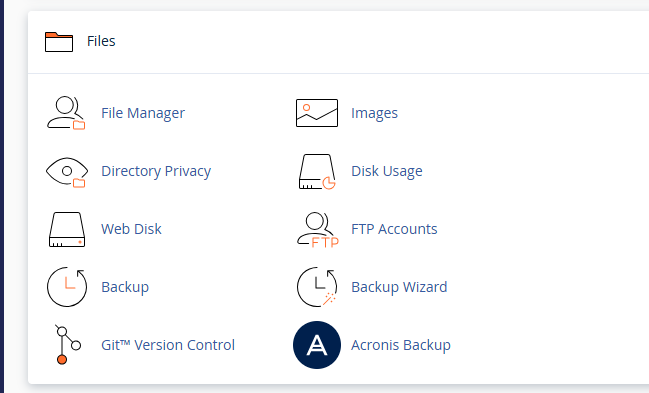
Softaculous

Installing WordPress
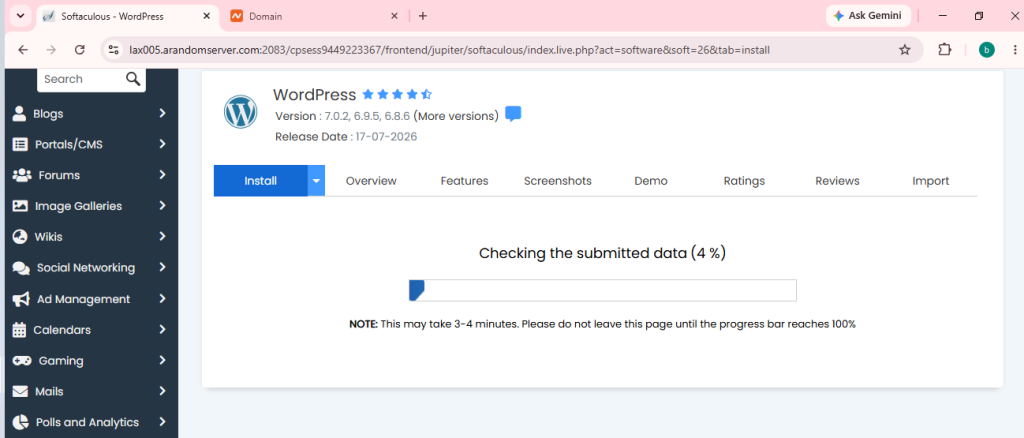
Installing WordPress took only a few minutes using Softaculous.
The general process was:
- Choose WordPress
- Select the domain
- Configure the site details
- Install
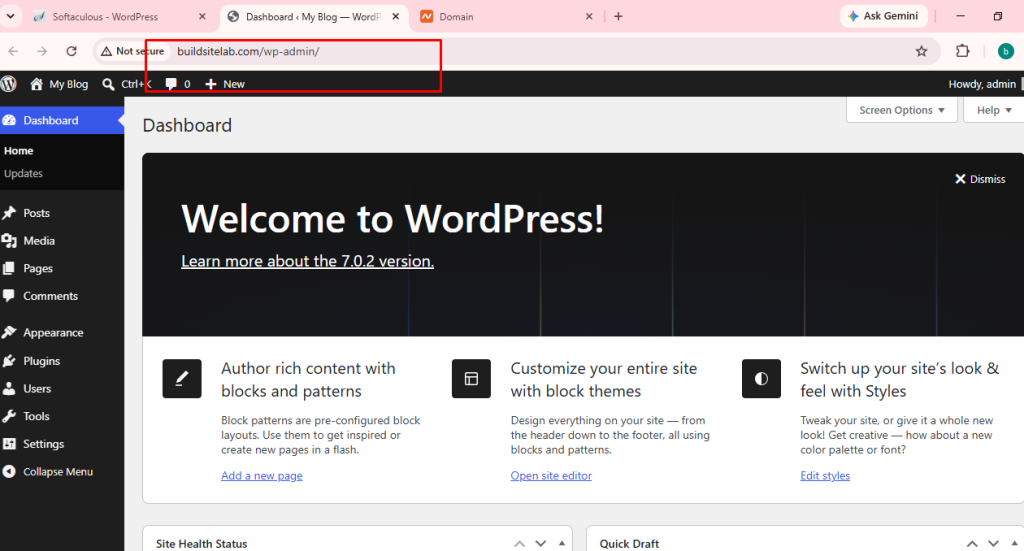
After installation, I could immediately log into the WordPress dashboard.
WordPress Installer
WordPress Admin
You can also like:
How to Install WordPress on HawkHost
Connecting My Domain
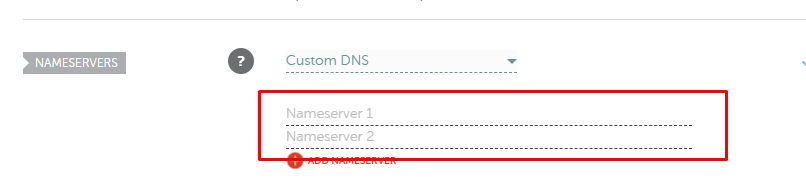
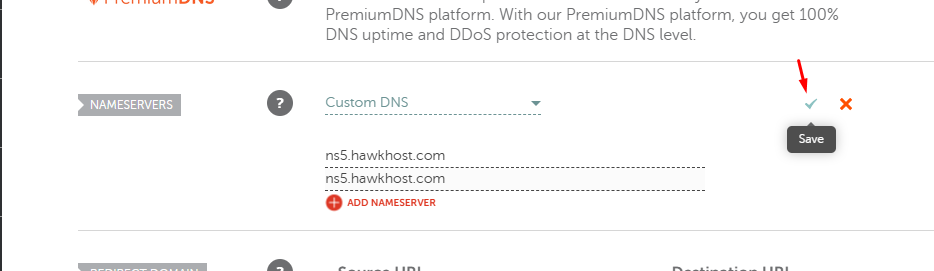
Since my domain was registered separately, I connected it to HawkHost by updating the nameservers.
The process involved:
- Finding the correct HawkHost nameservers
- Updating them at my domain registrar
- Waiting for DNS propagation
- Verifying that the website loaded correctly
📷 Nameservers
📷 Domain settings
You can read more :
How to Connect a Domain to HawkHost
How to Change Nameservers in HawkHost
Website Performance
Performance is one of the biggest reasons people choose a hosting provider.
Instead of making claims without evidence, I’m documenting the results of my own website.
Test Environment
At the time of writing:
- WordPress: Latest version
- Theme: Twenty Twenty-Five
- Cache: LiteSpeed Cache
- CDN: None
- SSL: Enabled
- Fresh WordPress installation
This information will help readers understand the context of the benchmarks.
GTmetrix Test
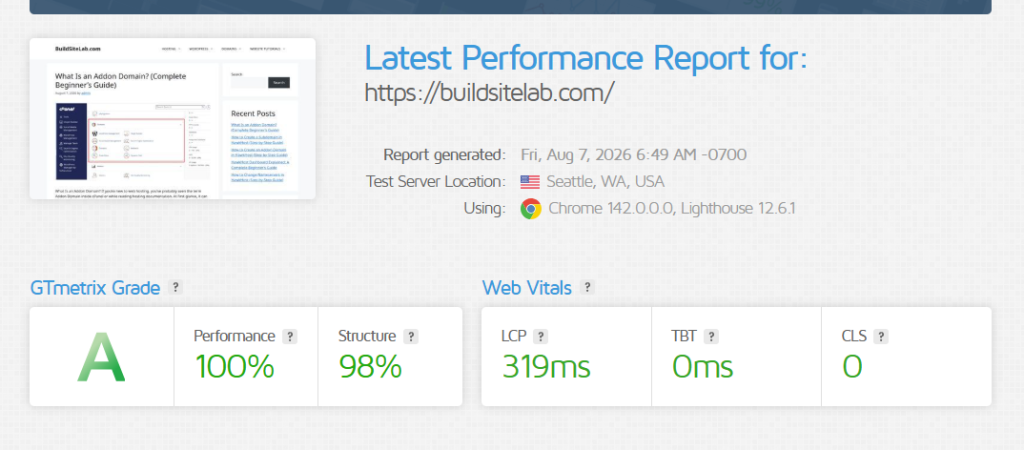
📷 GTmetrix report
Include:
- Performance score
- Structure score
- Largest Contentful Paint (LCP)
- Total Blocking Time (TBT)
- Cumulative Layout Shift (CLS)
Performance: 100%
The most impressive result in the report is the 100% Performance score.
This indicates that the website is currently loading very efficiently under the conditions of this test.
Because BuildSiteLab is still a relatively lightweight website, the result is partly influenced by the site’s current configuration. As I publish more articles and add more images, plugins, and functionality, I will continue monitoring this score.
My assessment: Excellent ⭐⭐⭐⭐⭐
Structure: 98%
BuildSiteLab received a 98% Structure score.
GTmetrix’s Structure score evaluates how well the website is technically configured for performance.
A score of 98% is already very strong. There is only a small amount of room for improvement according to this test.
For a new WordPress website, I consider this a very good starting point.
My assessment: Excellent ⭐⭐⭐⭐⭐
Largest Contentful Paint (LCP): 319 ms
The website recorded an LCP of just 319 milliseconds.
LCP measures how quickly the largest visible content element on the page becomes visible to the visitor.
Google considers an LCP of 2.5 seconds or less to be a good result.
My result was:
319 ms (0.319 seconds)
That is significantly below the 2.5-second threshold.
This suggests that the main content of the page is appearing very quickly during this test.
My assessment: Excellent ⭐⭐⭐⭐⭐
Total Blocking Time (TBT): 0 ms
The Total Blocking Time was 0 milliseconds.
TBT measures how much time the browser is blocked from responding to user interactions while the page is loading.
A lower value is better.
A result of 0 ms is excellent and indicates that there were no significant long-running tasks blocking the browser during this test.
This is particularly encouraging for a WordPress website because excessive JavaScript and poorly optimized plugins can sometimes increase blocking time.
My assessment: Excellent ⭐⭐⭐⭐⭐
Cumulative Layout Shift (CLS): 0
The website also achieved a CLS score of 0.
CLS measures how much the layout unexpectedly moves while a page is loading.
For example, if a visitor starts reading a paragraph and an image suddenly loads above it, causing the text to move down, that creates a layout shift.
A score of 0 means that GTmetrix detected no significant unexpected layout movement during the test.
This is a very good result for user experience.
My assessment: Excellent ⭐⭐⭐⭐⭐
My Overall Assessment
Based on this initial GTmetrix test, BuildSiteLab is currently performing very well on HawkHost.
The results were:
| Metric | Result | My Assessment |
|---|---|---|
| GTmetrix Grade | A | Excellent |
| Performance | 100% | Excellent |
| Structure | 98% | Excellent |
| LCP | 319 ms | Excellent |
| TBT | 0 ms | Excellent |
| CLS | 0 | Excellent |
The results are especially encouraging because the website is running on WordPress, yet it achieved a 100% Performance score and extremely low LCP and TBT values.
However, this is only the first test.
A new website with relatively little content is naturally easier to optimize than a larger website with hundreds of pages, images, plugins, and visitors.
For that reason, I plan to continue monitoring the website over the coming months.
Performance Tracking Over Time
I will use this first test as my baseline and update this review as the website grows.
| Testing Period | Performance | LCP | TBT | CLS |
|---|---|---|---|---|
| Initial test – August 2026 | 100% | 319 ms | 0 ms | 0 |
| 30 days | — | — | — | — |
| 90 days | — | — | — | — |
| 6 months | — | — | — | — |
| 12 months | — | — | — | — |
This should give me a much better understanding of how the hosting performs under real-world conditions as the website grows.
My current verdict
Initial performance: Excellent.
I am very happy with the first performance test, but I will wait for longer-term data before making any strong conclusions about HawkHost’s overall performance and reliability.
Google PageSpeed Insights
(Update after testing.)
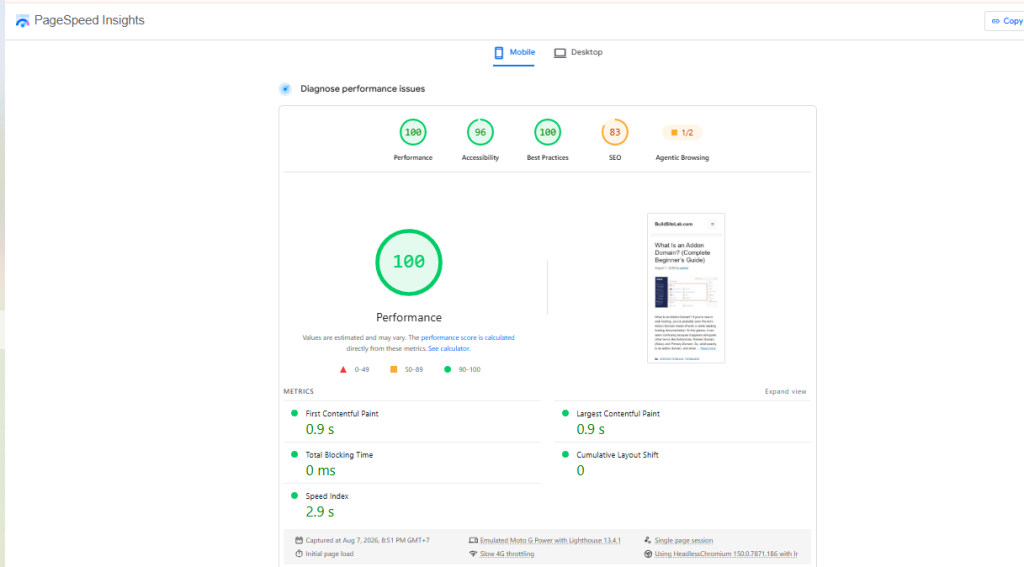
📷 Mobile results
Google PageSpeed Insights Test
In addition to GTmetrix, I also tested BuildSiteLab using Google PageSpeed Insights.
This test is particularly useful because it evaluates the website from Google’s perspective and provides separate scores for performance, accessibility, best practices, and SEO.
The screenshot below shows the mobile test results for BuildSiteLab.
PageSpeed Insights Results
| Metric | Score / Result | Assessment |
|---|---|---|
| Performance | 100 | Excellent |
| Accessibility | 96 | Excellent |
| Best Practices | 100 | Excellent |
| SEO | 83 | Good, with room for improvement |
| First Contentful Paint | 0.9 s | Excellent |
| Largest Contentful Paint | 0.9 s | Excellent |
| Total Blocking Time | 0 ms | Excellent |
| Cumulative Layout Shift | 0 | Excellent |
| Speed Index | 2.9 s | Good |
Performance: 100/100
The website received a perfect Performance score of 100/100 on the mobile test.
This is an excellent result, especially considering that mobile devices generally have more limited processing power and network conditions than desktop computers.
The result suggests that the current WordPress setup is loading efficiently.
My assessment: Excellent ⭐⭐⭐⭐⭐
First Contentful Paint: 0.9 Seconds
The First Contentful Paint (FCP) was 0.9 seconds.
FCP measures how quickly the first piece of visible content appears on the screen.
A result below one second is a very strong result. In this test, visitors should begin seeing content almost immediately after loading the page.
My assessment: Excellent ⭐⭐⭐⭐⭐
Largest Contentful Paint: 0.9 Seconds
The Largest Contentful Paint (LCP) was also 0.9 seconds.
LCP measures how quickly the largest visible content element is rendered.
Google considers an LCP of 2.5 seconds or less to be a good result. My website’s 0.9-second result is comfortably below that threshold.
This is particularly encouraging because LCP is one of the Core Web Vitals used to evaluate loading performance.
My assessment: Excellent ⭐⭐⭐⭐⭐
Total Blocking Time: 0 ms
The website recorded a Total Blocking Time of 0 ms.
This means PageSpeed Insights did not detect significant periods during which the browser was blocked from responding to user interactions during the test.
For a WordPress website, this is an excellent result.
My assessment: Excellent ⭐⭐⭐⭐⭐
Cumulative Layout Shift: 0
The Cumulative Layout Shift (CLS) score was 0.
This means the page remained visually stable while loading.
For example, visitors should not experience situations where text suddenly moves because an image or another element loads later.
My assessment: Excellent ⭐⭐⭐⭐⭐
Speed Index: 2.9 Seconds
The Speed Index was 2.9 seconds.
Speed Index measures how quickly the visible content of a page is populated during loading.
While the other performance metrics were excellent, this is one area where there is still some room for optimization.
However, a 2.9-second Speed Index does not indicate a serious performance problem, especially when the website has an LCP of only 0.9 seconds and a Performance score of 100.
My assessment: Good ⭐⭐⭐⭐☆
Accessibility: 96/100
BuildSiteLab received an Accessibility score of 96/100.
This is a very strong result, although there are still a few accessibility improvements that could potentially be made.
Accessibility is separate from hosting performance. It evaluates whether the website is easier to use for people with different abilities and whether elements such as text, links, colors, and page structure meet accessibility best practices.
My assessment: Excellent ⭐⭐⭐⭐⭐
Best Practices: 100/100
The website received a perfect 100/100 for Best Practices.
This is another excellent result.
It indicates that the page passed the relevant technical and security-related checks included in the PageSpeed test.
My assessment: Excellent ⭐⭐⭐⭐⭐
SEO: 83/100
The SEO score was 83/100.
This is the only score that stands out compared with the other results.
However, this does not mean that HawkHost is bad for SEO.
PageSpeed’s SEO score evaluates elements that can be detected on the tested page, such as:
- Crawlability
- HTML structure
- Meta information
- Mobile friendliness
- Links
- Search engine accessibility
Some of these factors are related to how the WordPress website is configured rather than the hosting provider itself.
Since BuildSiteLab is still a new website, I will continue improving its on-page SEO as I publish more content and complete the site’s technical SEO setup.
My assessment: Good ⭐⭐⭐⭐☆
My PageSpeed Insights Verdict
The mobile PageSpeed test produced very strong results overall.
The most important performance metrics were particularly impressive:
Performance: 100/100
FCP: 0.9 seconds
LCP: 0.9 seconds
TBT: 0 ms
CLS: 0
These results indicate that BuildSiteLab is currently loading quickly and maintaining a stable layout on mobile devices.
The 83 SEO score is something I will continue working on, but I don’t consider it a hosting performance issue.
As the website grows, I’ll repeat the PageSpeed test and compare the results over time.
📷 Desktop results
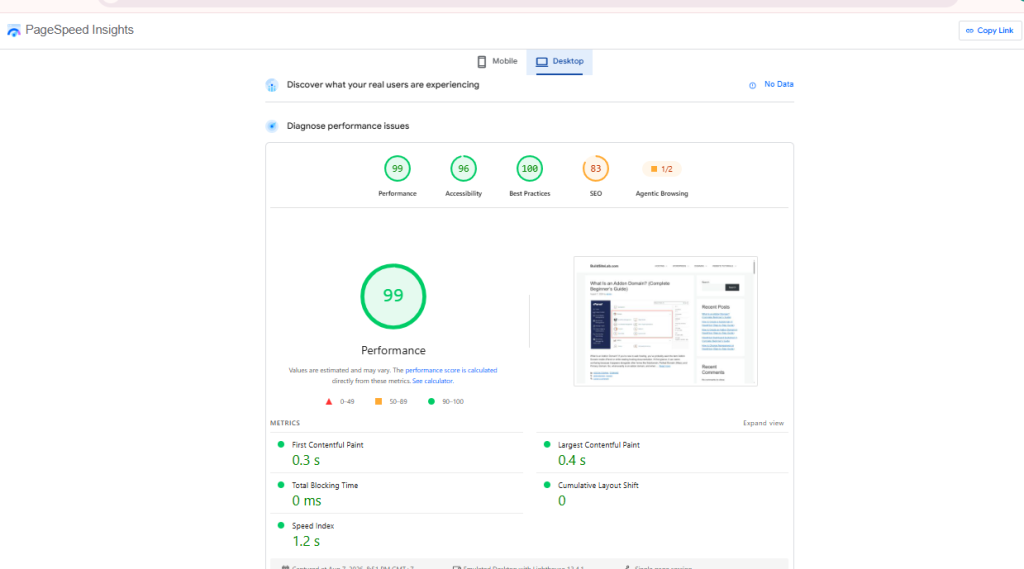
Google PageSpeed Insights – Desktop Test
I also tested BuildSiteLab using Google PageSpeed Insights on desktop.
The desktop test produced an excellent overall result, with a Performance score of 99/100.
Desktop PageSpeed Results
| Metric | Result | My Assessment |
|---|---|---|
| Performance | 99/100 | Excellent |
| Accessibility | 96/100 | Excellent |
| Best Practices | 100/100 | Excellent |
| SEO | 83/100 | Good |
| First Contentful Paint | 0.3 s | Excellent |
| Largest Contentful Paint | 0.4 s | Excellent |
| Total Blocking Time | 0 ms | Excellent |
| Cumulative Layout Shift | 0 | Excellent |
| Speed Index | 1.2 s | Excellent |
Performance: 99/100
BuildSiteLab achieved a 99/100 Performance score on the desktop test.
This is an excellent result and shows that the website is currently loading very efficiently under the tested conditions.
The score is slightly lower than the 100/100 result from the mobile test, but the difference is negligible.
My assessment: Excellent ⭐⭐⭐⭐⭐
First Contentful Paint: 0.3 Seconds
The First Contentful Paint (FCP) was only 0.3 seconds.
This means the first visible content appeared extremely quickly during the test.
My assessment: Excellent ⭐⭐⭐⭐⭐
Largest Contentful Paint: 0.4 Seconds
The Largest Contentful Paint (LCP) was 0.4 seconds.
This is an exceptionally fast result and well below the 2.5-second threshold generally considered good.
It indicates that the main visible content was rendered very quickly.
My assessment: Excellent ⭐⭐⭐⭐⭐
Total Blocking Time: 0 ms
The test recorded 0 ms of Total Blocking Time.
This means there was no significant browser blocking detected during the test.
For a WordPress website, this is an excellent result.
My assessment: Excellent ⭐⭐⭐⭐⭐
Cumulative Layout Shift: 0
The CLS score was 0, meaning the page remained visually stable while loading.
There was no significant unexpected movement of page elements during the test.
My assessment: Excellent ⭐⭐⭐⭐⭐
Speed Index: 1.2 Seconds
The Speed Index was 1.2 seconds, which is also an excellent result.
This indicates that the visible content of the page was populated very quickly.
My assessment: Excellent ⭐⭐⭐⭐⭐
Accessibility: 96/100
The website received an Accessibility score of 96/100.
This is a strong result, although there are still some areas that could potentially be improved.
Accessibility is primarily related to how easily people with different abilities can use the website, rather than the performance of the HawkHost server itself.
My assessment: Excellent ⭐⭐⭐⭐⭐
Best Practices: 100/100
BuildSiteLab received a perfect 100/100 Best Practices score.
This is another strong result and indicates that the page passed the relevant technical checks included in the PageSpeed audit.
My assessment: Excellent ⭐⭐⭐⭐⭐
SEO: 83/100
The SEO score was 83/100, which leaves some room for improvement.
I don’t consider this a hosting performance issue. PageSpeed’s SEO audit checks aspects of the website itself, such as technical SEO, crawlability, page elements, and mobile accessibility.
Since BuildSiteLab is still a new website, I will continue improving its on-page and technical SEO as I publish more content.
My assessment: Good ⭐⭐⭐⭐☆
Desktop vs. Mobile Performance
After testing both versions, the results are very encouraging.
| Metric | Mobile | Desktop |
|---|---|---|
| Performance | 100 | 99 |
| Accessibility | 96 | 96 |
| Best Practices | 100 | 100 |
| SEO | 83 | 83 |
| FCP | 0.9 s | 0.3 s |
| LCP | 0.9 s | 0.4 s |
| TBT | 0 ms | 0 ms |
| CLS | 0 | 0 |
| Speed Index | 2.9 s | 1.2 s |
Overall, both mobile and desktop tests show that BuildSiteLab is currently performing very well on HawkHost.
The desktop test is particularly impressive, with a 99/100 Performance score, 0.4-second LCP, 0 ms TBT, and 0 CLS.
However, these are still initial tests on a relatively new website. I’ll continue monitoring performance as the website grows and update this review with results after 30 days, 90 days, 6 months, and 12 months.
Pingdom Test
📷 Pingdom results
Include:
- Load time
- Page size
- Requests
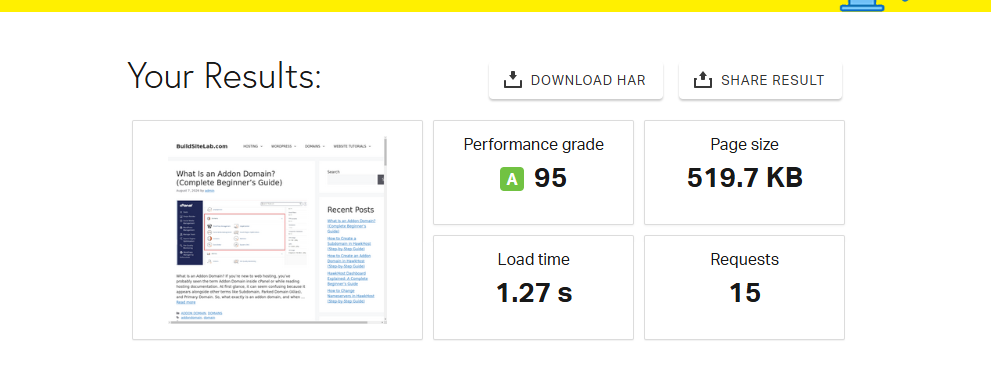
To further evaluate the performance of BuildSiteLab, I also tested the website using Pingdom Website Speed Test.
The result was very positive, with the website receiving an A performance grade and a score of 95/100.
Pingdom Test Results
| Metric | Result | Assessment |
|---|---|---|
| Performance Grade | A (95) | Excellent |
| Load Time | 1.27 seconds | Excellent |
| Page Size | 519.7 KB | Very Good |
| Requests | 15 | Low |
Performance Grade: A (95)
BuildSiteLab received an A grade with a score of 95/100.
This indicates that the page performed very well according to Pingdom’s performance measurements.
I consider this a strong result for a WordPress website, especially because the site is hosted on HawkHost and the test represents an actual page from my website rather than a theoretical benchmark.
My assessment: Excellent ⭐⭐⭐⭐⭐
Load Time: 1.27 Seconds
The measured load time was 1.27 seconds.
A page loading in around one second is a good target for a content-focused website. In this test, BuildSiteLab loaded in just over one second, which I consider very fast.
My assessment: Excellent ⭐⭐⭐⭐⭐
Page Size: 519.7 KB
The tested page had a total size of 519.7 KB.
This is relatively small for a WordPress page containing text, images, navigation, and other website resources.
Keeping the page lightweight should help maintain good performance as the website grows.
My assessment: Very Good ⭐⭐⭐⭐⭐
Requests: 15
Pingdom recorded 15 requests for the page.
This is a relatively low number of requests, suggesting that the page is not loading an excessive number of separate resources.
However, the number of requests alone doesn’t determine website speed. The size and type of those resources also matter.
My assessment: Excellent ⭐⭐⭐⭐⭐
My Pingdom Verdict
The Pingdom test produced another encouraging result for BuildSiteLab:
Performance Grade: A (95)
Load Time: 1.27 seconds
Page Size: 519.7 KB
Requests: 15
Combined with my PageSpeed Insights and GTmetrix results, these tests suggest that BuildSiteLab is currently loading quickly on HawkHost.
I will continue monitoring the website as it grows, because performance can change as more content, images, plugins, and visitors are added.
Resource Usage
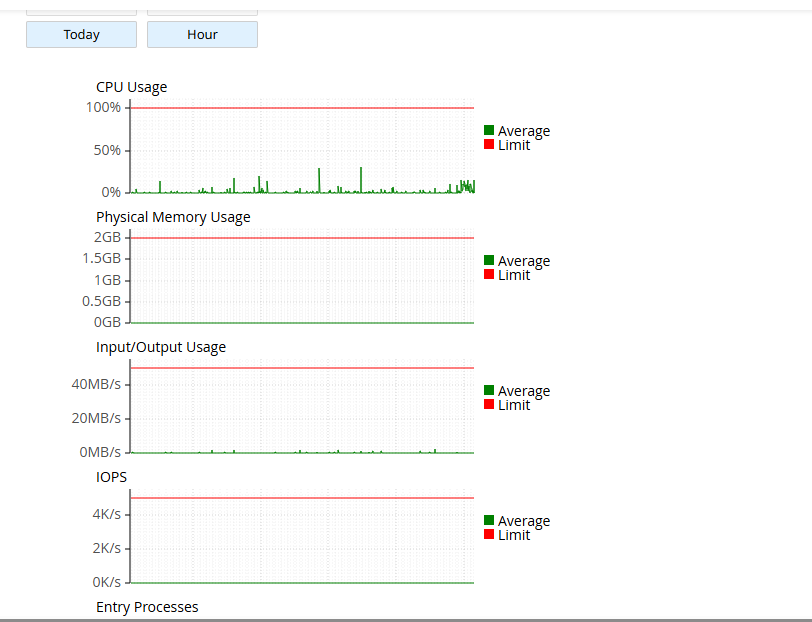
Another feature I like is being able to monitor hosting resources.
I’ll continue tracking:
- CPU usage
- Memory usage
- Entry processes
- I/O usage
This will show how the hosting performs as the website grows.
📷 Resource Usage
Support Experience
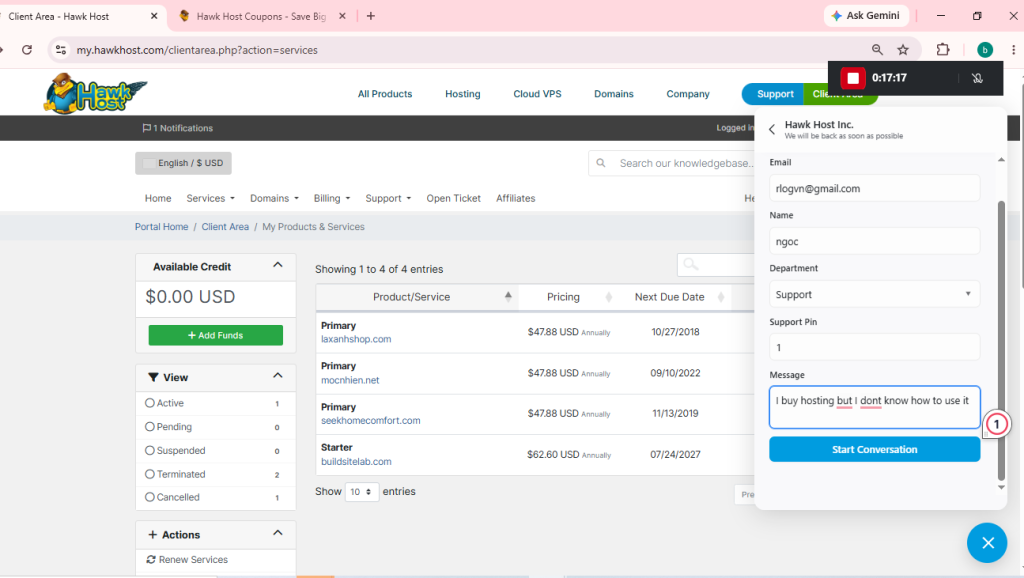
I haven’t had to contact support for a major issue yet.
When I do, I’ll update this section with:
- Response time
- Accuracy of the answer
- Overall experience
This should provide a more realistic picture than reviews based solely on specifications.
📷 Support ticket
Pros
After setting up the website, here are my first impressions.
Easy to set up
The entire process—from purchasing hosting to installing WordPress—was beginner-friendly.
Familiar cPanel Interface
Using cPanel makes it easier to follow tutorials and manage website settings.
Free SSL
SSL certificates can be enabled without additional cost.
LiteSpeed Server
LiteSpeed is included, which can benefit WordPress performance when paired with LiteSpeed Cache.
Affordable Pricing
Compared with many competitors, HawkHost offers competitive pricing for shared hosting.
Cons
No hosting provider is perfect.
Here are a few things I noticed.
Traditional Client Area
The interface focuses on functionality rather than modern design.
Performance Still Under Long-Term Testing
At this stage, I don’t have enough long-term data to draw conclusions about uptime or sustained performance. I’ll continue updating this review as I collect more real-world results.
Who Should Use HawkHost?
Based on my experience so far, HawkHost is suitable for:
- Beginners building their first website
- Bloggers
- Affiliate marketers
- Small business websites
- Portfolio websites
- WordPress users who prefer cPanel
If you expect extremely high traffic or need enterprise-level resources, you may eventually outgrow shared hosting and consider a VPS or dedicated server.
Frequently Asked Questions
Is HawkHost good for beginners?
Yes. The setup process is straightforward, and cPanel is familiar to many users.
Does HawkHost include free SSL?
Yes, free SSL certificates are available for hosted websites.
Can I install WordPress?
Yes. WordPress can be installed quickly using Softaculous.
Does HawkHost use cPanel?
Yes, HawkHost provides cPanel for hosting management.
Is HawkHost fast?
My initial experience has been positive, but I’ll continue updating this review with benchmark results and long-term observations.
Final Verdict
So far, my experience with HawkHost has been positive.
The purchasing process was simple, WordPress installation was straightforward, and the hosting environment provided everything I needed to launch this website.
Rather than making exaggerated claims, I’ll continue updating this article over the coming months with:
- Performance benchmarks
- Uptime data
- Resource usage
- Support interactions
- Long-term reliability
If you’re considering HawkHost, I hope this ongoing review helps you make a more informed decision based on real-world experience.