What Is a Subdomain?
You may have seen websites such as blog.example.com, shop.example.com, or support.example.com and wondered why they use a different address from the main website.
These are examples of subdomains.
A subdomain is created from an existing domain and appears before the main domain name. For example, if your main website is:
example.comyou could create:
blog.example.com
shop.example.com
support.example.com
docs.example.com
You normally don’t need to purchase a completely new domain for each subdomain. Instead, the subdomain can be created under a domain you already own, depending on your hosting and DNS configuration.
Subdomains are commonly used to organize different parts of a website, separate applications, create testing environments, or provide dedicated areas for documentation and support.
In this guide, we’ll explain what a subdomain is, how it works, when you should use one, and how it differs from a regular domain, addon domain, and subdirectory.
If you’re using HawkHost and want to create a subdomain, you can follow our detailed guide:
→ How to Create a Subdomain in HawkHost
What Is a Subdomain?
A subdomain is a part of a domain that appears before the main domain name.
For example:
blog.example.comYou can break this address into three parts:
blog.example.com
│    │       │
│    │       └── Domain extension
│    └────────── Main domain
└─────────────── Subdomain
In this example:
- blog is the subdomain.
- example.com is the main domain.
- .com is the domain extension.
Another example is:
support.example.comHere, support is the subdomain and example.com remains the main domain.
A single domain can have multiple subdomains.
For example:
example.com
│
├── blog.example.com
├── shop.example.com
├── support.example.com
├── docs.example.com
└── app.example.com
Each subdomain can serve a different purpose.
How Does a Subdomain Work?
When someone enters a subdomain into their browser, several systems work together to determine where that request should go.
A simplified flow looks like this:
User
  ↓
blog.example.com
  ↓
DNS
  ↓
Web Server
  ↓
Subdomain Configuration
  ↓
Website Files
For example, a visitor enters:
blog.example.comThe DNS configuration helps determine which server or service should handle that subdomain.
The web server then uses its configuration to determine where the website files or application associated with that subdomain are located.
For a subdomain hosted on the same hosting account, the structure could look something like:
blog.example.com
        ↓
/home/username/blog/
        ↓
Website files
The exact folder structure depends on your hosting provider and configuration.
A Simple Example
Imagine you have a HawkHost hosting account containing your main website:
example.comYou create:
blog.example.comThe subdomain could then point to a separate directory containing another website:
HawkHost Hosting
│
├── example.com
│
└── blog.example.com
        ↓
    /blog/
The subdomain doesn’t automatically mean that a second website must exist. You can configure it for different purposes depending on your needs.

What Are Some Common Subdomain Examples?
Subdomains are used for many different purposes.
Blog
One of the most recognizable examples is:
blog.example.comA company may use this address for articles, news, tutorials, and other content.
However, a blog doesn’t have to use a subdomain. Many websites instead use:
example.com/blog/We’ll compare these two structures later.
Support
A business may create:
support.example.comfor customer support content.
This could contain:
- Help articles
- Troubleshooting guides
- Documentation
- Contact information
- Frequently asked questions
Documentation
Technical websites commonly use:
docs.example.comfor product documentation.
This allows documentation to be managed separately from the main marketing website.
Application
A web application might use:
app.example.comFor example, the main website could explain the product while the application itself runs under the app subdomain.
example.com
      ↓
Marketing Website

app.example.com
      ↓
Web Application
Members Area
Membership websites may use:
members.example.comfor a private or authenticated section of the website.
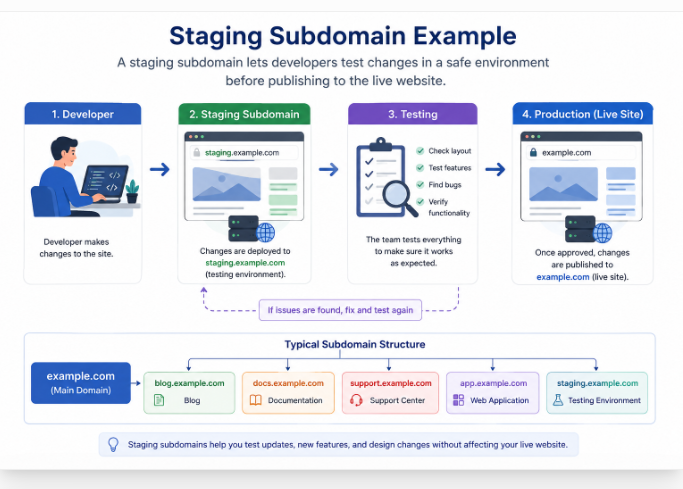
Staging
Developers sometimes create:
staging.example.comas a testing environment before publishing changes to the production website.
A typical structure might look like:
example.com
│
├── blog.example.com
├── docs.example.com
├── support.example.com
├── app.example.com
└── staging.example.com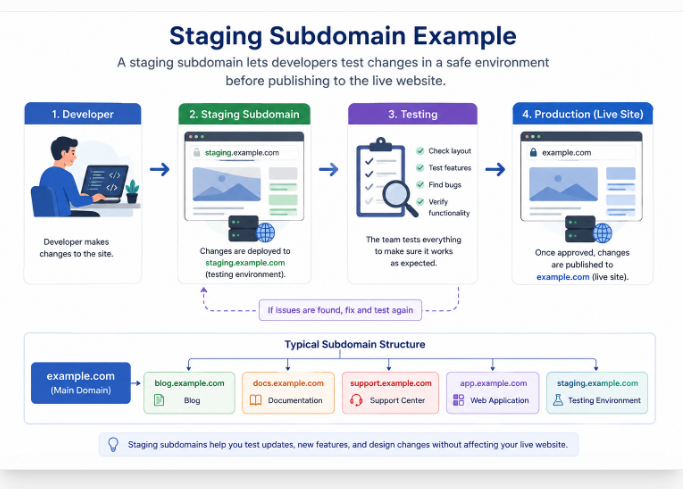
Why Do Websites Use Subdomains?
There isn’t one single reason to create a subdomain. Different websites use them for different architectural purposes.
1. Organize Different Parts of a Website
A large website may have several systems that need to be separated.
For example:
example.com
blog.example.com
docs.example.com
support.example.com
Each address clearly communicates its purpose.
2. Separate Applications
A company may have a public website and a separate application:
example.comfor the marketing website, and:
app.example.comfor the actual application.
This allows the application to have its own technology stack and deployment process if necessary.
3. Create a Testing Environment
A development team may use:
staging.example.comto test website updates before pushing them to:
example.comThis can reduce the risk of experimenting directly on the production website.
4. Separate User Areas
A website can use:
members.example.comfor registered users while keeping the main website publicly accessible.
Are Subdomains Free?
One of the most common beginner questions is whether a subdomain costs money.
Usually, you don’t have to purchase a subdomain separately.
If you already own:
example.comyou can generally create:
blog.example.comwithout registering blog.example.com as another domain.
However, this doesn’t necessarily mean that everything associated with the subdomain is free.
Depending on your setup, you may still have costs related to:
- Hosting
- Website software
- Applications
- Third-party services
- Additional resources
- SSL in certain configurations
The exact situation depends on your hosting provider and DNS setup.
So it’s better to say that a subdomain usually doesn’t require a separate domain registration, rather than saying that subdomains are always completely free.
Do Subdomains Need Separate Hosting?
Not necessarily.
A subdomain can be hosted on the same hosting account as your primary domain.
For example:
HawkHost Hosting
│
├── example.com
│
└── blog.example.com
Both can use the same hosting account while pointing to different website files or applications.
However, a subdomain can also point to a completely different server or service.
For example:
example.com
    ↓
Main Hosting

app.example.com
    ↓
Different Application Server
This is possible because DNS determines where the subdomain should point.
Therefore, a subdomain doesn’t automatically mean “another folder on the same hosting account.”
Its actual configuration depends on your DNS and hosting architecture.
What Is the Difference Between a Domain and a Subdomain?
The difference becomes easier to understand with an example.
Domain
example.comSubdomain
blog.example.comThe domain is the main registered domain.
The subdomain is created underneath that domain.
| Domain | Subdomain |
|---|---|
example.com | blog.example.com |
| Main domain | Part of the main domain |
| Requires domain registration | Usually doesn’t require separate registration |
| Can exist independently | Depends on the parent domain |
| Can have its own website | Can have its own website or application |
For example, you might register:
example.comThen create:
blog.example.comand:
docs.example.comYou don’t need to register each of those as separate domains.
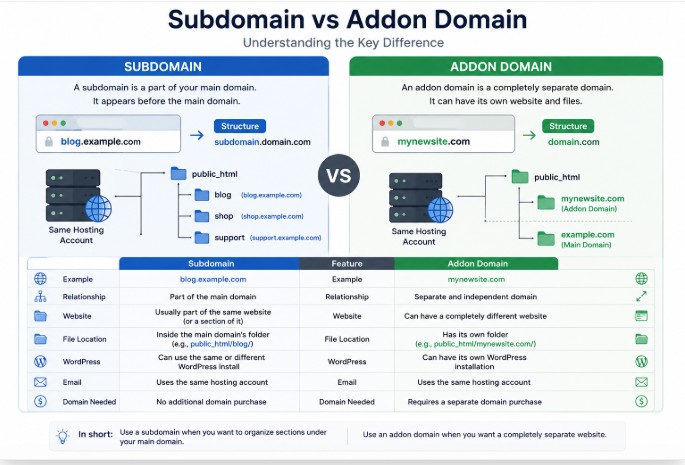
Subdomain vs Addon Domain
This distinction is particularly important if you’re using a hosting provider such as HawkHost.
Consider these two examples:
blog.example.comand:
secondsite.comThe first is a subdomain.
The second is a completely separate domain, which could be hosted as an addon domain.
| Subdomain | Addon Domain |
blog.example.com | secondsite.com |
| Belongs to the main domain | Separate registered domain |
| Usually no additional domain registration | Requires its own domain registration |
| Useful for sections or applications | Useful for independent websites |
| Can use the same hosting account | Can use the same hosting account |
Example: Subdomain
buildsitelab.com
      ↓
blog.buildsitelab.com
The blog subdomain belongs to buildsitelab.com.
Example: Addon Domain
buildsitelab.com
      ↓
Main Website

anotherwebsite.com
      ↓
Separate Website
The second domain is independent from the first.
If you’re unsure about addon domains, see:
→ What Is an Addon Domain?
And if you’re ready to create one:
→ How to Create an Addon Domain in HawkHost
Subdomain vs Subdirectory
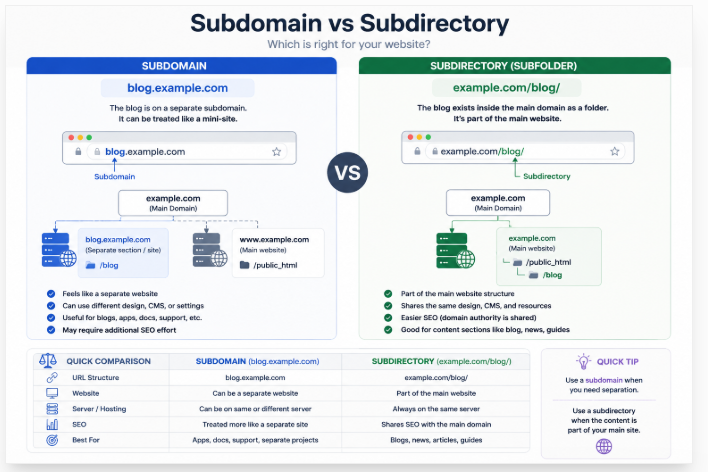
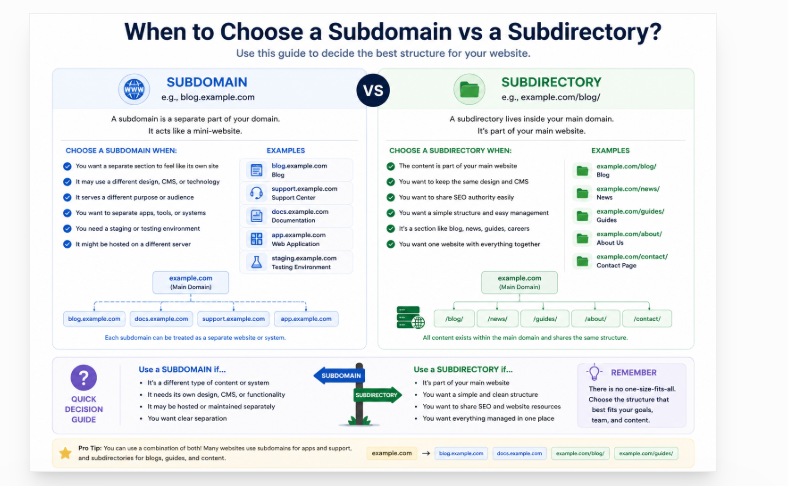
Another important decision is whether to use a subdomain or a subdirectory.
You might structure a blog as:
blog.example.comor:
example.com/blog/The first is a subdomain.
The second is a subdirectory, sometimes called a subfolder.
Comparison
| Subdomain | Subdirectory |
blog.example.com | example.com/blog/ |
| Separate subdomain level | Part of the main domain structure |
| Can use a separate system | Usually part of the main website |
| Useful for independent applications | Useful for sections of the main website |
| Can have separate hosting | Usually uses the main website’s hosting |
When Should You Use a Subdirectory?
If your blog is simply another section of your main website, a subdirectory may be the simpler structure.
For example:
example.com
│
├── about/
├── services/
├── blog/
└── contact/
The blog is clearly part of the main website.
For many content-focused websites, this structure is straightforward to manage.
When Should You Use a Subdomain?
A subdomain can make more sense when the section is relatively independent.
Examples include:
docs.example.com
app.example.com
support.example.com
These may use different software, different workflows, or different deployment systems.
For example:
example.com
      ↓
Main Website

app.example.com
      ↓
Application

docs.example.com
      ↓
Documentation
The important point is that there is no universal rule that subdomains are always better or worse than subdirectories.
The right choice depends on your website architecture and what you’re trying to build.
Subdomains and SEO
SEO is one reason people often ask whether they should use a subdomain.
Google can crawl and index content located on a subdomain.
For example:
example.comand:
blog.example.comcan both be discovered and indexed.
However, you should not create a subdomain simply because you expect it to provide an automatic SEO advantage.
The decision should be based primarily on your website architecture and the purpose of the subdomain.
For example, if you are creating:
docs.example.comfor a documentation system, using a subdomain can be perfectly reasonable.
Likewise:
app.example.comcan make sense for a web application.
But if you’re simply creating a blog that is tightly integrated with your main website, you may prefer:
example.com/blog/The important thing is to choose a structure that is logical, maintainable, and appropriate for your users.
Can You Have Internal Links Between a Domain and Subdomain?
Yes.
For example:
example.com
       ↕
blog.example.com
       ↕
docs.example.com
You can link between your main domain and its subdomains.
For example, your main website could link to:
blog.example.comwhile the blog could link back to:
example.comThis can help users navigate between different parts of your website architecture.
If you’re using multiple subdomains, make sure the navigation remains clear and consistent.
Can a Subdomain Have Its Own WordPress Website?
Yes.
A subdomain can have its own WordPress installation.
For example:
example.com
    ↓
Main WordPress Website

blog.example.com
    ↓
Separate WordPress Website
The subdomain can have its own:
- WordPress installation
- Theme
- Plugins
- Content
- Users
- Settings
However, you don’t always need a separate WordPress installation.
If your goal is simply to create a blog that’s part of your main website, you could instead use:
example.com/blog/This is an architectural decision rather than a technical requirement.
If you’re using HawkHost and want to install WordPress, see:
→ How to Install WordPress on HawkHost
How to Create a Subdomain
This article focuses on what a subdomain is, rather than providing a complete setup tutorial.
The basic process looks like this:
Step 1: Connect Your Domain
First, make sure your main domain is correctly connected to your hosting or DNS provider.
→ How to Connect a Domain to HawkHost
Step 2: Open Your Hosting Control Panel
Access the control panel associated with your hosting account.
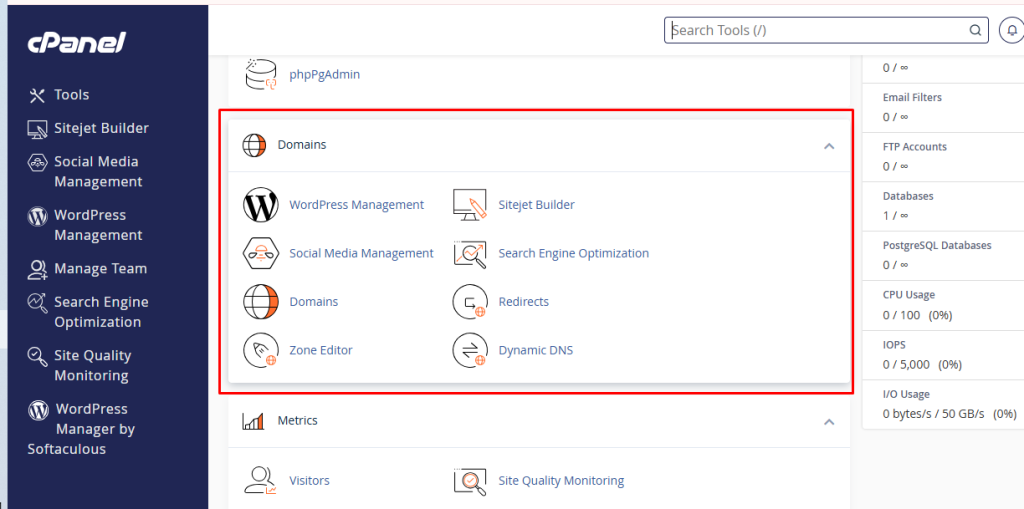
Step 3: Open the Domains Section
In cPanel, find the Domains section.
Step 4: Create the Subdomain
Enter the subdomain you want to use.
For example:
blogwhich creates:
blog.example.comStep 5: Configure the Document Root
Depending on your hosting setup, you may be able to choose where the subdomain’s files are stored.
For example:
blog.example.com
       ↓
/home/username/blog/
Step 6: Install Your Website
You can then install WordPress or another application on the subdomain if required.
For the complete HawkHost tutorial, including screenshots and detailed steps:
→ How to Create a Subdomain in HawkHost
Common Subdomain Problems
Creating a subdomain is usually straightforward, but DNS and hosting configuration can sometimes cause problems.
The Subdomain Doesn’t Open
If:
blog.example.comdoesn’t load, check:
- DNS records
- Nameservers
- Hosting configuration
- Subdomain configuration
If you recently changed DNS settings, allow time for the changes to propagate.
DNS_PROBE_FINISHED_NXDOMAIN
If your browser displays:
DNS_PROBE_FINISHED_NXDOMAINthe DNS system may not currently have a valid record for the subdomain.
Check where your DNS is managed and confirm that the subdomain has the appropriate configuration.
The Wrong Website Appears
If your subdomain displays another website, check:
- DNS configuration
- Document Root
- Hosting configuration
- Domain configuration
The subdomain may be pointing to the wrong location.
SSL Doesn’t Work
If:
http://blog.example.comworks but:
https://blog.example.comdoesn’t, check the SSL certificate for the subdomain.
You may need to configure or issue an SSL certificate for the subdomain.
→ How to Install Free SSL on HawkHost
The Subdomain Redirects to the Main Website
If:
blog.example.comautomatically redirects to:
example.comcheck:
- Redirect rules
.htaccess- WordPress URL settings
- Hosting configuration
A redirect may be intentional, but if you expected a separate website, investigate the configuration.
Frequently Asked Questions
What is a subdomain?
A subdomain is a section of an existing domain that appears before the main domain name.
For example:
blog.example.comHere, blog is the subdomain and example.com is the main domain.
Is a subdomain a separate domain?
No.
A subdomain is created under an existing domain.
For example:
example.comis the domain, while:
blog.example.comis a subdomain.
Do I need to buy a subdomain?
Usually not.
If you already own:
example.comyou can generally create:
blog.example.comwithout purchasing another domain registration.
Are subdomains free?
A subdomain generally doesn’t require a separate domain registration, but hosting, applications, third-party services, or other configuration-related costs may still apply.
The exact cost depends on your setup.
Can I create multiple subdomains?
Yes.
You could have:
blog.example.com
docs.example.com
support.example.com
app.example.com
The number you can create depends on your hosting and DNS configuration.
Can I install WordPress on a subdomain?
Yes.
You can install WordPress separately on a subdomain.
For example:
example.comcould run one WordPress website while:
blog.example.comruns another.
What is the difference between a subdomain and an addon domain?
A subdomain belongs to your existing domain:
blog.example.comAn addon domain is a separate registered domain:
secondsite.comAn addon domain is generally used when you want to host another independent website.
Is a subdomain good for SEO?
A subdomain can be crawled and indexed by search engines.
However, you shouldn’t choose a subdomain solely because you expect an SEO advantage.
Use a subdomain when it makes sense for your website architecture, such as for applications, documentation, support systems, or other relatively independent sections.
How long does it take for a subdomain to work?
If the DNS configuration is already correct, it may begin working quickly.
However, new DNS changes can take time to propagate.
If your subdomain isn’t working after creating it, check your DNS and hosting configuration.
What Should You Do Next?
Now that you understand what a subdomain is, the next step depends on what you’re trying to build.
If you’re learning the basics of domains:
→ What Is a Domain?
If you’re comparing different ways to host multiple websites:
If you want to create an independent website under another domain:
→ How to Create an Addon Domain in HawkHost
If you want to create a subdomain on your HawkHost account:
→ How to Create a Subdomain in HawkHost
If your domain isn’t connected to HawkHost yet:
→ How to Connect a Domain to HawkHost
If you need to change where your domain points:
→ How to Change Nameservers in HawkHost
And after creating your subdomain, you can continue with:
→ How to Install WordPress on HawkHost
Final Thoughts
A subdomain is a simple but powerful way to organize different parts of a website under an existing domain.
For example:
example.com
│
├── blog.example.com
├── docs.example.com
├── support.example.com
└── app.example.com
Each subdomain can serve a different purpose, from publishing blog content to hosting documentation, applications, support systems, or testing environments.
The most important thing is understanding that a subdomain is not the same as an addon domain or a subdirectory.
A subdomain:
blog.example.combelongs to:
example.comAn addon domain:
anotherwebsite.comis a separate registered domain that can host an independent website.
And a subdirectory:
example.com/blog/is simply a section within the main website’s URL structure.
There is no single structure that is best for every website. Choose the option that matches your content, application, hosting setup, and long-term website architecture.
If you’re using HawkHost and have decided that a subdomain is the right choice, continue with our step-by-step tutorial:
1 thought on “What Is a Subdomain? A Beginner’s Guide to Subdomains”