What Is an Addon Domain?
If you’re new to web hosting, you’ve probably seen the term Addon Domain inside cPanel or while reading hosting documentation. At first glance, it can seem confusing because it appears alongside other terms like Subdomain, Parked Domain (Alias), and Primary Domain.
So, what exactly is an addon domain, and when should you use one?
In simple terms, an addon domain allows you to host another independent website on the same hosting account. Instead of purchasing a second hosting plan, you can use your existing account (if your hosting plan supports multiple websites) to manage another domain with its own files, database, email accounts, and WordPress installation.
For example, imagine you already own:
buildsitelab.comLater, you purchase another domain:
mytravelblog.comInstead of buying another hosting package, you can add mytravelblog.com as an addon domain and host both websites from the same HawkHost account.
This guide explains what an addon domain is, how it works, its advantages and disadvantages, and when you should use one. If you’re looking for the actual setup instructions, we’ll also point you to our step-by-step tutorial later in this article.
What Is an Addon Domain?
An addon domain is an additional domain that can be hosted under an existing hosting account.
Although multiple websites share the same hosting resources, each website can operate independently.
For example:
Hosting Account
│
├── buildsitelab.com
│
├── mytravelblog.com
│
└── photographytips.net
Even though all three websites use one hosting account, each website can have:
- Different website files
- Different WordPress installation
- Separate database
- Separate email accounts
- Separate SSL certificate
- Different visitors
- Different content
To visitors, the websites appear completely unrelated.
How Does an Addon Domain Work?
When you create an addon domain, cPanel creates a separate directory (called the Document Root) for the new website.
For example:
public_html
│
├── buildsitelab/
│
└── mytravelblog/
When someone visits:
mytravelblog.comthe web server loads files from:
/public_html/mytravelblog/rather than from your primary website.
Although everything is stored under one hosting account, each website remains isolated at the file level.
Why Do Hosting Companies Offer Addon Domains?
Many website owners don’t need an entire hosting account for every website.
Instead of paying for multiple hosting plans, they simply host several small or medium-sized websites together.
Typical examples include:
- Personal blog
- Portfolio website
- Affiliate website
- Company website
- Landing page
- Client website
Using addon domains allows users to manage these projects from a single dashboard.
Primary Domain vs Addon Domain
One of the biggest beginner questions is the difference between a Primary Domain and an Addon Domain.
| Feature | Primary Domain | Addon Domain |
|---|---|---|
| First domain on hosting | ✅ | ❌ |
| Separate website | ✅ | ✅ |
| Separate WordPress | ✅ | ✅ |
| Uses same hosting account | — | ✅ |
| Separate files | ✅ | ✅ |
| Separate email | ✅ | ✅ |
Your hosting account always has one Primary Domain.
Every additional website you add becomes an Addon Domain.
Addon Domain vs Subdomain
These two concepts are often confused.
Addon Domain
Example:
travelblog.comCompletely different website.
Subdomain
Example:
blog.buildsitelab.comPart of the existing domain.
Comparison
| Feature | Addon Domain | Subdomain |
| Needs another registered domain | ✅ | ❌ |
| Separate website | ✅ | Usually |
| Different brand | ✅ | ❌ |
| Separate SEO identity | ✅ | Depends |
| Example | travelblog.com | blog.buildsitelab.com |
A subdomain belongs to your existing domain.
An addon domain is an entirely different domain.
Addon Domain vs Parked Domain (Alias)
Another common misunderstanding involves parked domains.
Suppose you own:
buildsitelab.comYou also register:
build-site-lab.comIf both domains display exactly the same website, the second domain is normally configured as a Parked Domain (Alias).
Visitors see identical content regardless of which domain they type.
An addon domain is different because it hosts a separate website.
When Should You Use an Addon Domain?
Addon domains are useful in many situations.
Building Multiple Websites
For example:
buildsitelab.com
mytravelblog.com
photographytips.net
Each website focuses on a different topic.
Affiliate Marketing
Many affiliate marketers create several niche websites.
Instead of paying for separate hosting plans, they often host multiple sites together.
Testing New Projects
You may want to launch a new website before deciding whether it deserves its own hosting account.
An addon domain lets you start quickly.
Managing Client Websites
Freelancers sometimes manage several small client websites from one hosting account.
Advantages of Addon Domains
Lower Cost
You don’t need another hosting package.
Easier Management
Everything is managed from one cPanel account.
Independent Websites
Each website has its own:
- Files
- WordPress installation
- Database
- SSL certificate
- Email accounts
Better Resource Utilization
If your hosting plan has unused resources, addon domains allow you to make better use of them.
Disadvantages of Addon Domains
Addon domains aren’t perfect.
Shared Resources
All websites share:
- CPU
- RAM
- Disk space
- Bandwidth
If one website experiences heavy traffic, the others may also be affected.
Security Risks
If one poorly maintained website is compromised, it may increase the risk to other websites on the same hosting account.
Keeping all websites updated is essential.
Harder to Scale
As your websites grow, you may eventually want to separate them onto different hosting accounts or VPS servers.
Can Each Addon Domain Have Its Own WordPress Site?
Yes.
This is one of the biggest advantages.
Example:
buildsitelab.com
        ↓
WordPress Site A

mytravelblog.com
        ↓
WordPress Site B

photographytips.net
        ↓
WordPress Site C
Each WordPress installation has its own:
- Themes
- Plugins
- Users
- Posts
- Settings
- Database
Can Each Addon Domain Have Email?
Yes.
For example:
info@mytravelblog.com
support@mytravelblog.com

hello@photographytips.net
Each domain can have its own professional email accounts.
Do Addon Domains Affect SEO?
Not directly.
Google indexes websites—not hosting accounts.
If two addon domains contain unique, high-quality content, they can both rank independently.
However, avoid creating duplicate websites across multiple addon domains, as duplicate content can harm search performance.
Should Beginners Use Addon Domains?
It depends.
If you only plan to build one website, start with your primary domain.
If you already have one successful website and want to launch another independent project, an addon domain is a practical choice.
Before adding multiple websites, make sure your hosting plan provides enough resources to support them comfortably.
Frequently Asked Questions
Is an addon domain free?
You still need to purchase the domain name itself. However, if your hosting plan supports multiple websites, you usually don’t need to buy another hosting account.
Do I need another hosting plan?
Usually not.
One hosting account can often host multiple addon domains, depending on your plan.
Can I install WordPress?
Yes.
Each addon domain can have its own independent WordPress installation.
Can addon domains have SSL?
Yes.
Each website can use its own SSL certificate.
Is an addon domain the same as a subdomain?
No.
A subdomain belongs to your existing domain.
An addon domain is a completely separate registered domain.
Can I remove an addon domain later?
Yes.
You can remove it through cPanel, although you should back up your website before making any changes.
How Addon Domains Work in HawkHost
If you’re using HawkHost, managing addon domains is straightforward because everything is handled through cPanel.
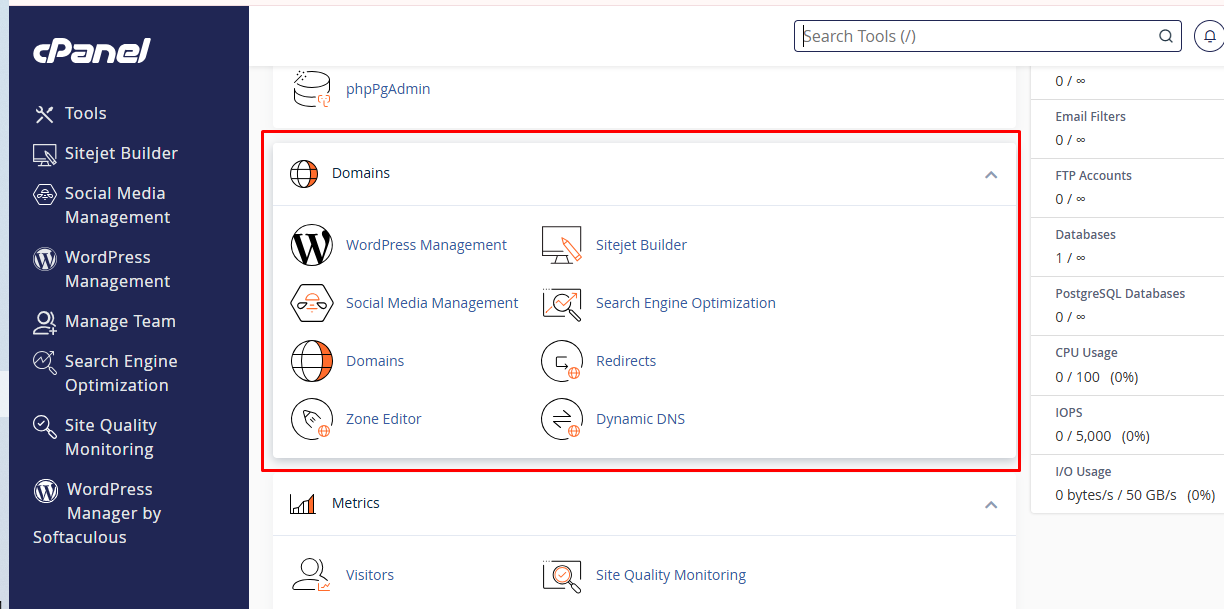
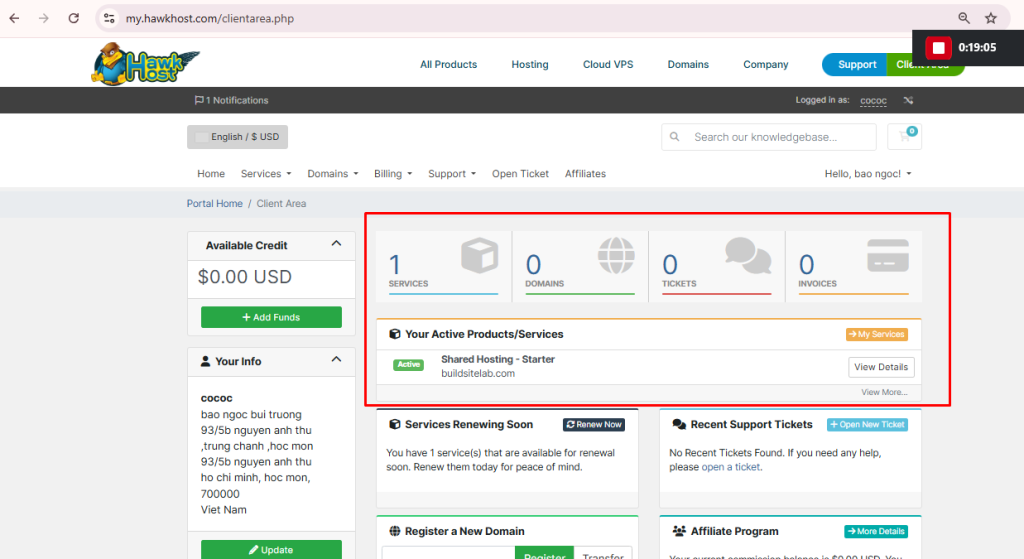
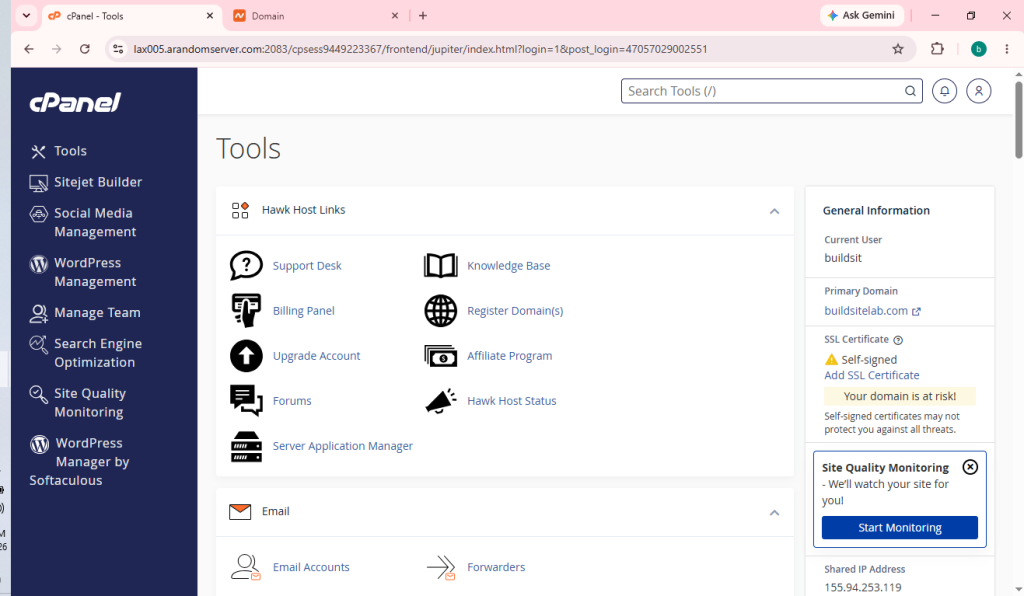
After logging in to your HawkHost Client Area, you can access cPanel directly from your hosting service. Inside cPanel, open the Domains section, where you’ll find the tools used to manage your existing domains and create new ones.
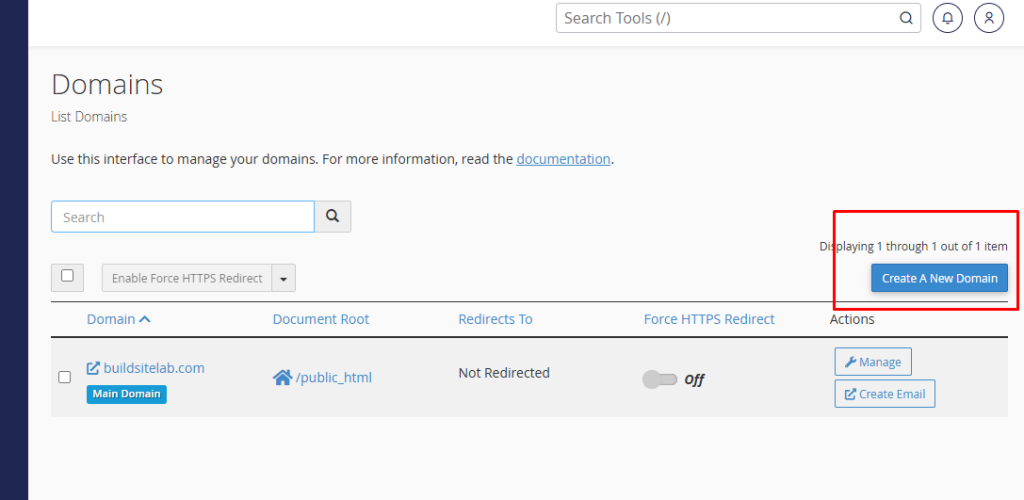
From there, you can choose the option to create a new domain. During the setup process, cPanel will ask you to enter your domain name and automatically create a dedicated Document Root for your website. This folder stores all of your website files separately from your primary domain, helping keep multiple websites organized.
After the domain is added successfully, it will appear in the domain list. At this stage, you can continue by:
- Installing WordPress
- Uploading website files
- Creating email accounts
- Enabling an SSL certificate
- Managing DNS if necessary
It’s important to remember that creating an addon domain inside cPanel is only one part of the process. Your domain must also point to your HawkHost hosting account using the correct nameservers or DNS records. Otherwise, visitors won’t be able to access your website.
If this is your first time adding another website to your hosting account, don’t worry. The entire process only takes a few minutes once your domain is correctly connected.
What’s Next?
Now that you understand what an addon domain is and when it should be used, the next step is learning how to create one inside HawkHost.
In our next guide, we’ll walk through the entire process—from opening cPanel to adding the domain, selecting the correct document root, checking DNS, and installing WordPress.
👉 Next Guide: How to Create an Addon Domain in HawkHost
You’ll also find these tutorials helpful as you continue setting up your hosting:
- Addon Domain vs Subdomain
- How to Connect a Domain to HawkHost
- How to Access HawkHost cPanel
- How to Install WordPress on HawkHost
Final Thoughts
An addon domain is one of the most useful features offered by cPanel hosting. It allows you to host multiple independent websites under a single hosting account, helping you save money while keeping each site separate.
For beginners, the most important thing is understanding what an addon domain is and when it makes sense to use one. Once you’re comfortable with the concept, creating an addon domain in HawkHost becomes a straightforward task that only takes a few minutes.